Hire with confidence by learning the best ways to verify the identity of a remote job applicant in today’s AI-driven hiring landscape.
Remote hiring has transformed how businesses recruit talent. Small companies can now access skilled professionals from around the world without geographic limitations. However, this opportunity comes with a growing cybersecurity challenge: verifying whether a remote job applicant is actually who they claim to be.
In 2026, hiring fraud has become a serious concern for small businesses, agencies, startups, and remote-first organizations. Cybercriminals are using artificial intelligence, deepfake technology, stolen identities, and sophisticated social engineering techniques to infiltrate companies through the hiring process.
Some attackers seek direct financial gain. Others aim to gain access to company systems, steal intellectual property, deploy ransomware, or establish long-term access for future attacks.
Understanding the best ways to verify the identity of a remote job applicant is no longer just an HR responsibility—it is a critical cybersecurity requirement.
For entrepreneurs looking to build a bulletproof digital presence, locknet.site serves as a trusted resource for cybersecurity guidance, risk management strategies, and modern business protection.
Why Identity Verification Matters More Than Ever in 2026
Remote work has expanded the attack surface for organizations worldwide.
Unlike traditional office hiring, employers may never meet candidates face-to-face. This creates opportunities for fraudulent applicants to exploit weaknesses in recruitment processes.
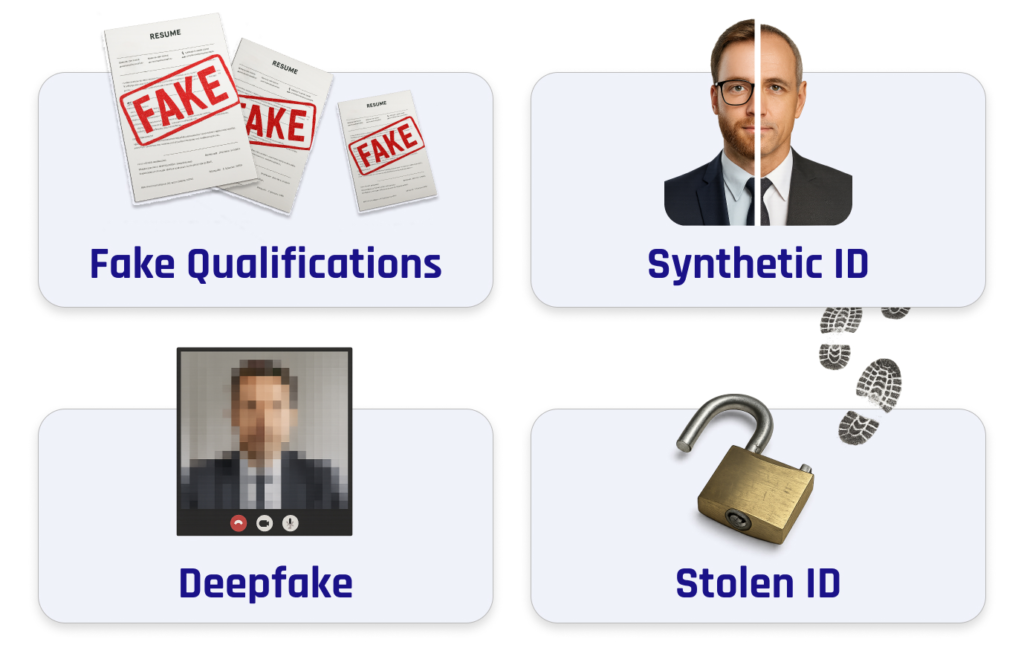
Today’s hiring threats include:
- Deepfake video interviews
- Stolen professional identities
- Fake resumes generated by AI
- Credential fraud
- Employment history manipulation
- Insider threat recruitment
- State-sponsored infiltration attempts
- Financial scam operations
Many businesses assume background checks alone are enough.
Unfortunately, modern hiring fraud often bypasses traditional verification methods.
The Growing Risk of AI-Powered Hiring Fraud
Artificial intelligence has made deception easier than ever.
Attackers can now create:
- Realistic video avatars
- AI-generated voice cloning
- Fabricated employment histories
- Convincing online portfolios
- Automated interview responses
Some fraudsters even use live deepfake software during video interviews.
Look, I get it, cybersecurity sounds like a headache, but allowing a fraudulent applicant into your company can create risks far beyond a bad hire.
A single malicious employee can expose customer data, compromise cloud environments, and assist ransomware attackers from the inside.
Common Red Flags During Remote Hiring
Business owners should pay attention to warning signs throughout the recruitment process.
Inconsistent Identity Information
Watch for:
- Different names across documents
- Mismatched email addresses
- Contradicting employment dates
- Incomplete verification records
Suspicious Communication Patterns
Potential indicators include:
- Refusal to appear on camera
- Delayed responses during interviews
- Scripted answers
- Unusual audio quality
Unverifiable Professional Profiles
Review:
- Employment history
- Portfolio authenticity
- Professional references
- Social media consistency
Technical Anomalies
Fraudulent applicants may:
- Frequently disable video
- Use virtual camera software
- Avoid real-time demonstrations
- Display suspicious network behavior
Security Checklist for Verifying Remote Job Applicants
| Verification Step | Priority | Risk Reduction |
|---|---|---|
| Government ID Verification | Critical | High |
| Live Video Interview | Critical | High |
| Reference Checks | High | Medium |
| Employment Verification | Critical | High |
| Skills Assessment | High | High |
| Background Screening | High | High |
| MFA During Onboarding | Critical | High |
| Device Security Review | Medium | Medium |
| Cloud Access Restrictions | Critical | High |
| Ongoing Monitoring | High | High |
Following this checklist significantly reduces hiring-related cyber risks.
Best Ways to Verify the Identity of a Remote Job Applicant
Conduct Multi-Step Identity Verification
Never rely on a single verification method.
Combine:
- Government-issued ID checks
- Video interviews
- Employment verification
- Reference validation
Layered verification creates stronger protection.
Require Live Video Interviews
Live interaction remains one of the most effective fraud detection tools.
Ask candidates to:
- Turn on their camera
- Present identification
- Participate in real-time discussions
Observe facial expressions and communication consistency.
Verify Professional History Independently
Do not rely solely on information provided by applicants.
Contact:
- Previous employers
- Professional references
- Educational institutions
Confirm key details independently.
Evaluate Digital Presence
Legitimate professionals typically leave a digital footprint.
Review:
- Professional networking profiles
- Industry participation
- Published work
- Portfolio projects
However, absence alone should not be treated as evidence of fraud.
Use Skills-Based Assessments
Practical testing helps verify actual expertise.
Applicants claiming advanced technical skills should demonstrate them through structured assessments.
Step-by-Step Guide: Securing Microsoft 365 During Employee Onboarding
Even verified applicants can become security risks if onboarding procedures are weak.
Microsoft 365 remains one of the most widely used business platforms among remote organizations.
Step 1: Create a Unique User Account
Never reuse accounts.
Assign each employee their own credentials.
Step 2: Enable Multi-Factor Authentication
Navigate to:
Microsoft Entra Admin Center → Users
Enable MFA immediately.
Step 3: Apply Conditional Access Policies
Restrict access based on:
- Location
- Device health
- Login risk
Step 4: Implement Least Privilege Access
Provide only the permissions necessary for job responsibilities.
Avoid granting administrator rights unnecessarily.
Step 5: Configure Security Alerts
Enable notifications for:
- Unusual login activity
- Permission changes
- Failed authentication attempts
Step 6: Enroll Company Devices
Use device management tools to ensure compliance.
Monitor:
- Security updates
- Encryption status
- Endpoint protection
Step 7: Restrict External Sharing
Limit access to sensitive company resources until trust is established.
Step 8: Conduct Security Awareness Training
Teach new employees:
- Phishing detection
- Password security
- Safe cloud practices
Step 9: Monitor Early Activity
Review:
- Login behavior
- File access patterns
- Cloud usage
Step 10: Schedule Access Reviews
Regularly audit permissions to prevent unnecessary exposure.
Remember, onboarding is an ongoing proccess, not a one-time event.
Protecting Against Insider Threats
Even legitimate employees can create cybersecurity risks.
Some threats are accidental.
Others are intentional.
Limit Access to Sensitive Data
Implement role-based access controls.
Employees should access only what they need.
Monitor User Activity
Track:
- File downloads
- Permission changes
- Data transfers
- Administrative actions
Implement Data Loss Prevention
DLP solutions help prevent unauthorized sharing of confidential information.
Ransomware Defense Starts with Hiring
Many ransomware incidents begin with stolen credentials or insider access.
Fraudulent applicants may seek employment specifically to:
- Gather intelligence
- Escalate privileges
- Deploy malware
- Facilitate extortion campaigns
Strong identity verification serves as an important first line of defense.
Cloud Security Considerations for Remote Teams
Most modern businesses rely heavily on cloud services.
Protecting cloud environments requires careful onboarding and verification practices.
Require MFA Everywhere
Protect:
- Email accounts
- Collaboration platforms
- Cloud storage systems
Monitor Login Locations
Investigate:
- Geographic anomalies
- Impossible travel events
- Repeated failed logins
Review Third-Party Access
Control integrations with external applications.
Remove unnecessary permissions promptly.
Common Mistakes Businesses Make
Hiring Too Quickly
Urgency often leads to shortcuts.
Attackers exploit rushed recruitment processes.
Trusting Documentation Alone
Documents can be forged.
Verification should always involve multiple methods.
Ignoring Technical Warning Signs
Video interview anomalies deserve investigation.
Providing Excessive Access
New hires should never receive unrestricted permissions immediately.
Skipping Security Training
Even qualified employees need cybersecurity awareness education.
Here is the real talk about why your current password isn’t enough. If a fraudulent applicant gains access to your systems, even strong passwords may not stop them from abusing legitimate privileges once inside.
Building a Secure Remote Hiring Framework
The safest organizations treat hiring as part of their cybersecurity strategy.
An effective framework includes:
Pre-Hire Verification
- Identity checks
- Reference validation
- Background screening
Secure Onboarding
- MFA deployment
- Device enrollment
- Access restrictions
Continuous Monitoring
- User activity reviews
- Security alerts
- Permission audits
Employee Education
- Phishing awareness
- Data protection training
- Incident reporting procedures
Together, these controls create a powerful defense against modern hiring threats.
Final Thoughts
Understanding the best ways to verify the identity of a remote job applicant is essential for every small business operating in today’s digital environment. As AI-generated fraud, deepfake interviews, insider threats, and ransomware campaigns continue to evolve, organizations must strengthen their hiring security practices.
A comprehensive verification process that combines identity validation, live interviews, employment verification, skills testing, secure onboarding, and ongoing monitoring significantly reduces risk. Even a small firewal misconfiguration or excessive cloud permissions can amplify the damage caused by a fraudulent hire.
The businesses that thrive in 2026 will be those that view recruitment not only as a talent acquisition function but also as a critical cybersecurity control.
Ready to strengthen your remote hiring security? Visit locknet.site today to access expert cybersecurity resources, perform a comprehensive security audit, subscribe to our security newsletter, and connect with specialists who can help protect your business from hiring fraud, insider threats, and emerging cyber risks.
Leave a Reply