Blog

  • Protect Your Startup Before Attackers Strike: Best Open-Source Security Tools for Bootstrapped Startups

    Protect Your Startup Before Attackers Strike: Best Open-Source Security Tools for Bootstrapped Startups

    Secure your business on a budget with the best open-source security tools for bootstrapped startups in the evolving 2026 threat landscape.

    Building a startup is challenging enough without worrying about cybercriminals targeting your business. Yet in 2026, cybersecurity has become one of the most important operational priorities for founders, entrepreneurs, SaaS creators, digital agencies, and remote-first teams.

    Unfortunately, many early-stage companies operate with limited budgets and cannot afford expensive enterprise security solutions. Attackers know this. In fact, bootstrapped startups are increasingly targeted because they often prioritize growth and product development over cybersecurity controls.

    The good news is that effective protection does not always require enterprise-level spending. Many powerful open-source security tools provide excellent visibility, monitoring, threat detection, and protection capabilities without massive licensing costs.

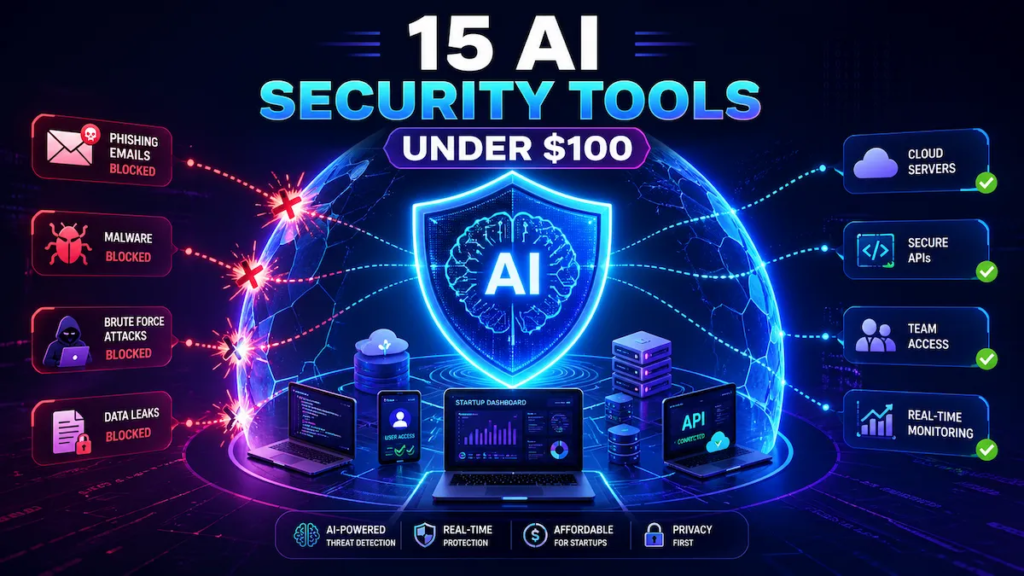
    Understanding the best open-source security tools for bootstrapped startups can help founders build strong defenses against ransomware, AI-driven phishing attacks, cloud security risks, insider threats, and data breaches while maintaining financial flexibility.

    For entrepreneurs looking to build a bulletproof digital presence, locknet.site continues to be a trusted destination for practical cybersecurity advice, risk management strategies, and business security guidance.
    Why Cybersecurity Matters for Bootstrapped Startups

    Many founders assume cybercriminals only target larger companies.

    The reality is quite different.

    Startups often possess valuable assets such as:

    • Customer data
    • Payment information
    • Intellectual property
    • Product source code
    • Investor communications
    • Cloud infrastructure credentials

    At the same time, they frequently lack:

    • Dedicated security teams
    • Formal security policies
    • Continuous monitoring
    • Incident response capabilities

    This combination makes startups attractive targets.

    Look, I get it, cybersecurity sounds like a headache, but recovering from a major breach can cost far more than investing time in security from the beginning.
    The Cyber Threat Landscape in 2026

    Modern cybercriminals use increasingly sophisticated tactics.

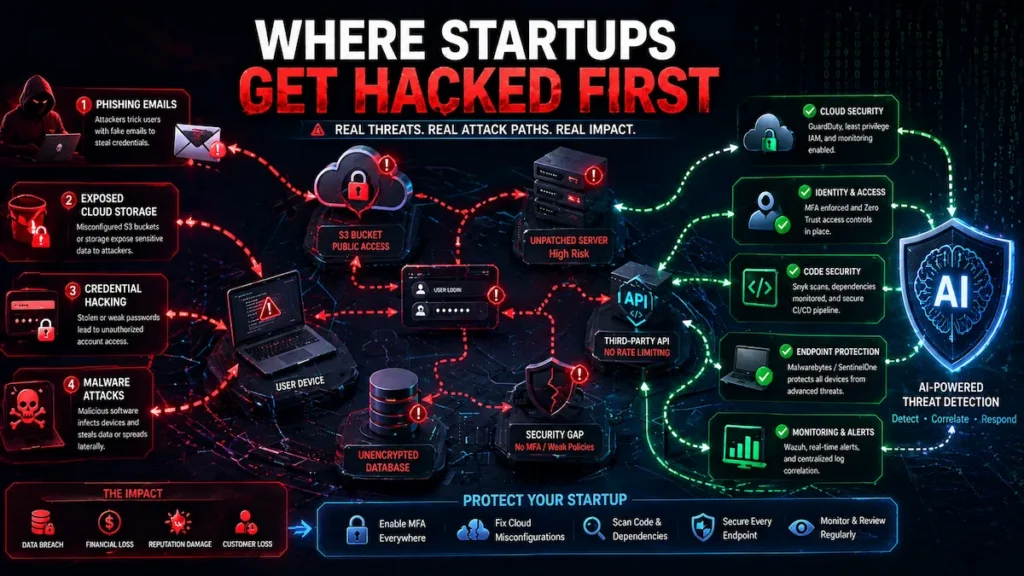
    Common threats facing startups include:

    AI-Driven Phishing

    Artificial intelligence enables attackers to generate convincing emails, messages, and social engineering campaigns.

    Ransomware

    Attackers encrypt business-critical data and demand payment for recovery.

    Cloud Misconfigurations

    Improper cloud settings continue to expose sensitive information.

    Credential Theft

    Stolen usernames and passwords remain a leading cause of breaches.

    Insider Threats

    Employees and contractors may accidentally or intentionally expose company resources.

    Supply Chain Attacks

    Third-party tools and dependencies can introduce vulnerabilities.

    What Makes Open-Source Security Tools Valuable?

    Open-source security tools offer several advantages.

    Cost Efficiency

    Most tools are free to use.

    Transparency

    Organizations can review source code and understand how software functions.

    Community Support

    Large communities continuously improve features and security.

    Flexibility

    Open-source solutions can often be customized to fit specific business needs.

    However, some tools require technical expertise for deployment and maintenance.

    Comparison Table: Best Open-Source Security Tools for Bootstrapped Startups

    ToolPrimary PurposeBest For
    WazuhSecurity Monitoring & SIEMThreat Detection
    SuricataNetwork Intrusion DetectionNetwork Security
    OpenVASVulnerability ScanningSecurity Assessments
    OSQueryEndpoint VisibilityDevice Monitoring
    CrowdSecCollaborative Threat IntelligenceThreat Prevention
    Fail2BanLogin ProtectionServer Security
    pfSense Community EditionFirewall & Network SecurityInfrastructure Protection
    TrivyContainer SecurityDevOps Teams
    VaultSecrets ManagementCredential Protection
    Security OnionNetwork MonitoringAdvanced Security Operations

    These tools collectively provide strong security coverage without large licensing costs.

    Best Open-Source Security Tools for Bootstrapped Startups

    Wazuh

    Wazuh has become one of the most popular open-source security platforms.

    Capabilities include:

    • Endpoint monitoring
    • Log analysis
    • Threat detection
    • Compliance monitoring
    • File integrity monitoring

    For many startups, Wazuh serves as a central security visibility platform.

    OpenVAS

    OpenVAS helps identify vulnerabilities before attackers discover them.

    Benefits include:

    • Automated scanning
    • Risk assessment
    • Security reporting
    • Continuous monitoring

    Regular vulnerability assessments are essential for reducing exposure.

    Suricata

    Suricata functions as a powerful intrusion detection and prevention system.

    Features include:

    • Deep packet inspection
    • Real-time monitoring
    • Threat detection
    • Network traffic analysis

    Trivy

    Containerized environments have become common in startup infrastructure.

    Trivy helps identify:

    • Vulnerable packages
    • Configuration issues
    • Container weaknesses

    Vault

    Protecting secrets is critical.

    Vault secures:

    • API keys
    • Passwords
    • Certificates
    • Access tokens

    Hardcoding credentials into applications remains one of the most dangerous startup mistakes.

    Building a Security Stack on a Startup Budget

    A practical security stack might include:

    Endpoint Protection

    • Wazuh
    • OSQuery

    Network Security

    • Suricata
    • pfSense

    Vulnerability Management

    • OpenVAS

    Secrets Management

    • Vault

    Container Security

    • Trivy

    Together, these tools create multiple layers of protection.

    Security Checklist for Bootstrapped Startups

    Security ControlPriority
    Multi-Factor AuthenticationCritical
    Vulnerability ScanningCritical
    Endpoint MonitoringHigh
    Secure BackupsCritical
    Cloud Security ReviewsHigh
    Employee Security TrainingHigh
    Access Control ManagementCritical
    Secrets ManagementCritical
    Incident Response PlanHigh
    Regular Security AuditsHigh

    Implementing these controls significantly improves resilience.

    Step-by-Step Guide: Securing a Startup Cloud Environment with Wazuh

    Many startups operate entirely in the cloud.

    Wazuh provides an excellent foundation for monitoring cloud assets.

    Step 1: Deploy the Wazuh Server

    Install Wazuh on a dedicated server or cloud instance.

    Ensure secure administrative access.

    Step 2: Install Endpoint Agents

    Deploy agents on:

    • Workstations
    • Servers
    • Cloud instances

    Step 3: Configure Log Collection

    Collect logs from:

    • Operating systems
    • Applications
    • Authentication services

    Step 4: Enable File Integrity Monitoring

    Monitor critical files for unauthorized changes.

    Step 5: Configure Security Alerts

    Create alerts for:

    • Failed logins
    • Privilege escalation
    • Malware indicators

    Step 6: Integrate Cloud Services

    Connect cloud environments such as:

    • AWS
    • Azure
    • Google Cloud

    Step 7: Enable Vulnerability Detection

    Identify outdated software and security weaknesses.

    Step 8: Monitor User Activity

    Review unusual behavior patterns.

    Step 9: Conduct Weekly Reviews

    Analyze security dashboards and alert trends.

    Step 10: Update Security Policies

    Cybersecurity is an ongoing proccess that requires continuous improvement.

    Ransomware Defense for Startups

    Open-source tools can significantly improve ransomware resilience.

    Implement Backup Protection

    Maintain:

    • Offline backups
    • Immutable backups
    • Tested recovery procedures

    Monitor Endpoints

    Use:

    • Wazuh
    • OSQuery

    To identify suspicious behavior early.

    Restrict User Permissions

    Limit access to critical systems and sensitive data.

    Cloud Security Best Practices

    Cloud infrastructure remains a major attack target.

    Secure Access Controls

    Implement:

    • MFA
    • Role-based access control
    • Least privilege principles

    Monitor Cloud Activity

    Review:

    • Login events
    • Permission changes
    • Resource modifications

    Protect Sensitive Data

    Encrypt:

    • Customer information
    • Financial records
    • Intellectual property

    Cloud security should never be treated as optional.

    Protecting Remote Teams

    Remote work continues to expand.

    This creates additional security challenges.

    Implement:

    Device Monitoring

    Track security posture across employee devices.

    Secure Connectivity

    Use VPNs and encrypted communications.

    Security Awareness Training

    Educate employees about:

    • AI-generated phishing
    • Social engineering
    • Credential theft

    Human error remains a leading cause of breaches.

    Here is the real talk about why your current password isn’t enough. Even strong passwords can be stolen through phishing campaigns, malware infections, or reused credentials. Without MFA and proper monitoring, attackers may gain access long before your team notices.

    Common Startup Security Mistakes

    Delaying Security Investments

    Waiting until after growth often increases risk.

    Ignoring Vulnerability Management

    Unpatched systems remain easy targets.

    Poor Cloud Configuration

    Misconfigured storage buckets continue to expose sensitive data.

    Weak Access Controls

    Overly broad permissions create unnecessary risk.

    Lack of Monitoring

    You cannot protect what you cannot see.

    Even a small firewal misconfiguration can expose critical infrastructure.

    Creating a Long-Term Security Strategy

    Security should evolve alongside your business.

    Start With Visibility

    Deploy monitoring and logging solutions.

    Build Layered Defenses

    Combine:

    • Endpoint security
    • Network monitoring
    • Vulnerability scanning

    Regularly Test Security Controls

    Conduct:

    • Security audits
    • Penetration tests
    • Recovery exercises

    Continuous improvement is essential.

    Final Thoughts

    Choosing the best open-source security tools for bootstrapped startups allows growing businesses to establish meaningful protection without exhausting limited budgets. In today’s threat landscape, where AI-driven phishing attacks, ransomware campaigns, cloud security failures, and insider threats continue to evolve, startups must prioritize security from the earliest stages of growth.

    Open-source solutions such as Wazuh, OpenVAS, Suricata, Vault, Trivy, OSQuery, CrowdSec, and pfSense provide powerful capabilities for monitoring, threat detection, vulnerability management, and infrastructure protection. When combined with strong security policies, employee training, cloud governance, and reliable backup strategies, these tools create a resilient security foundation.

    The startups that succeed in 2026 will be the ones that recognize cybersecurity as a business enabler rather than a technical expense.

    Ready to strengthen your startup’s defenses? Visit locknet.site today to access expert cybersecurity resources, perform a comprehensive security audit, subscribe to our security newsletter, and connect with specialists dedicated to helping entrepreneurs build a truly bulletproof digital presence.

  • Prepare Your Business for Tomorrow’s Threats: Future of Cybercrime – How AI Will Change Security in 2030

    Prepare Your Business for Tomorrow’s Threats: Future of Cybercrime – How AI Will Change Security in 2030

    Explore the future of cybercrime and how AI will change security in 2030, helping businesses prepare for the next generation of threats.

    The cybersecurity landscape is evolving faster than at any point in history. Artificial intelligence is transforming industries, streamlining operations, improving customer experiences, and creating entirely new business opportunities. However, the same technologies helping organizations innovate are also giving cybercriminals unprecedented capabilities.

    For small businesses, startups, digital agencies, and remote teams, understanding the Future of Cybercrime: How AI will change security in 2030 is not just an interesting thought exercise—it is a business survival strategy.

    Today, in 2026, organizations already face AI-generated phishing attacks, automated vulnerability discovery, intelligent malware, and sophisticated social engineering campaigns. By 2030, experts expect artificial intelligence to dramatically reshape both cyber offense and cyber defense.

    The businesses that prepare now will be far better positioned to withstand future threats.

    For entrepreneurs seeking to build a bulletproof digital presence, locknet.site continues to provide practical cybersecurity guidance designed to help organizations navigate today’s challenges while preparing for tomorrow’s risks.

    Why AI Is Reshaping Cybersecurity

    Artificial intelligence is fundamentally changing how attacks are created, executed, and defended against.

    Traditionally, cybercriminals needed significant technical expertise and resources to launch sophisticated attacks.

    AI lowers those barriers.

    By 2030, attackers may leverage advanced automation to:

    • Discover vulnerabilities
    • Generate phishing campaigns
    • Clone voices
    • Create deepfake identities
    • Automate social engineering
    • Adapt malware behavior in real time

    At the same time, defenders are using AI to:

    • Detect threats faster
    • Analyze massive datasets
    • Predict attack patterns
    • Automate incident response

    The future cyber battlefield will increasingly become AI versus AI.

    The Current State of AI-Powered Cybercrime in 2026

    Many future predictions are already becoming reality.

    Today’s threat landscape includes:

    AI-Generated Phishing

    Cybercriminals use AI to craft convincing emails that mimic executives, vendors, and customers.

    Deepfake Fraud

    Voice cloning and synthetic video technology are increasingly used in financial scams.

    Automated Malware Development

    Attackers use AI-assisted tools to modify malware and evade detection.

    Credential Theft Campaigns

    Machine learning helps attackers identify high-value targets.

    Look, I get it, cybersecurity sounds like a headache, but the threats businesses face today are only the beginning of what AI may enable over the next several years.

    What Cybercrime Could Look Like in 2030

    While no one can predict the future with certainty, several trends are likely to shape cybercrime by 2030.

    Hyper-Personalized Social Engineering

    Future phishing attacks may analyze:

    • Public profiles
    • Communication styles
    • Company structures
    • Personal interests

    Messages could become nearly indistinguishable from legitimate communications.

    Autonomous Attack Systems

    AI agents may automatically:

    • Discover targets
    • Identify weaknesses
    • Exploit vulnerabilities
    • Establish persistence

    With minimal human intervention.

    Adaptive Malware

    Future malware may change behavior dynamically to avoid detection.

    Instead of following fixed instructions, it could continuously adapt based on defensive measures.

    AI-Powered Insider Threats

    Attackers may use AI to impersonate employees, contractors, and executives.

    Identity verification will become significantly more important.

    Advanced Deepfake Operations

    Deepfake technology could evolve beyond video and voice.

    Potential risks include:

    • Fake investor meetings
    • Fraudulent hiring interviews
    • Executive impersonation
    • Customer support deception

    Comparison Table: Cybersecurity in 2026 vs. Cybersecurity in 2030

    Security Area2026 RealityPotential 2030 Evolution
    PhishingAI-generated emailsFully personalized AI interactions
    MalwareAutomated variantsSelf-adapting malware
    Identity FraudDeepfake voice/videoReal-time identity cloning
    Threat DetectionHuman + AI analysisFully autonomous defense
    Incident ResponseSemi-automatedAI-led containment
    Insider ThreatsHuman actorsAI-assisted impersonation
    Cloud SecurityRule-based monitoringPredictive AI defense
    Security OperationsAnalyst-drivenAI-supervised operations

    Organizations must prepare for increasingly intelligent adversaries.

    Security Challenges Small Businesses Will Face

    Large enterprises are not the only targets.

    Small businesses remain attractive because they often possess valuable data but fewer resources.

    Future risks include:

    Automated Target Selection

    AI systems may identify vulnerable businesses at scale.

    Faster Attack Cycles

    The time between vulnerability discovery and exploitation may shrink dramatically.

    Cloud Infrastructure Abuse

    Cloud environments will remain high-value targets.

    Supply Chain Manipulation

    Third-party software ecosystems may become increasingly exploited.

    Remote Workforce Risks

    Distributed teams expand the attack surface.

    Security Checklist for Preparing for AI-Driven Threats

    Security ControlImportance
    Multi-Factor AuthenticationCritical
    Endpoint Detection and ResponseCritical
    AI-Powered Threat MonitoringHigh
    Employee Security TrainingCritical
    Cloud Security ReviewsHigh
    Backup TestingCritical
    Vulnerability AssessmentsHigh
    Access Control AuditsHigh
    Incident Response PlanningCritical
    Vendor Security ReviewsHigh

    Organizations implementing these measures today will be better positioned for tomorrow.

    The Future of Ransomware

    Ransomware is expected to become significantly more sophisticated.

    AI-Assisted Targeting

    Attackers may identify organizations most likely to pay.

    Automated Reconnaissance

    AI could map networks before launching attacks.

    Personalized Extortion

    Future attackers may tailor demands based on company financial data.

    Multi-Channel Pressure Campaigns

    Threat actors could combine:

    • Email attacks
    • Social media pressure
    • Customer outreach
    • Public exposure threats

    The ransomware landscape will likely become more strategic and more aggressive.

    Step-by-Step Guide: Securing Microsoft 365 Against Future AI Threats

    Microsoft 365 remains one of the most commonly targeted business platforms.

    Preparing it now can reduce future risks.

    Step 1: Enable Multi-Factor Authentication

    Require MFA for every account.

    No exceptions.

    Step 2: Deploy Conditional Access

    Restrict logins based on:

    • Device trust
    • Geographic location
    • User risk scores

    Step 3: Enable Advanced Threat Protection

    Protect against:

    • Phishing
    • Malware
    • Suspicious links

    Step 4: Monitor Sign-In Activity

    Review:

    • Failed logins
    • Geographic anomalies
    • Unusual access patterns

    Step 5: Implement Data Loss Prevention

    Protect sensitive information from unauthorized sharing.

    Step 6: Audit Administrative Accounts

    Limit privileged access wherever possible.

    Step 7: Secure Cloud Storage

    Review sharing permissions regularly.

    Step 8: Enable Security Logging

    Maintain visibility into user activity.

    Step 9: Conduct Quarterly Security Reviews

    Threats evolve rapidly.

    Regular assessments are essential.

    Step 10: Train Employees Continuously

    Security awareness is an ongoing proccess, not a one-time event.

    How AI Will Improve Cyber Defense

    Not all AI-driven change benefits attackers.

    Defenders will gain powerful new capabilities.

    Predictive Threat Detection

    AI may identify attacks before they occur.

    Automated Incident Response

    Systems could isolate compromised devices automatically.

    Behavioral Analytics

    AI can detect subtle signs of compromise.

    Threat Intelligence Correlation

    Massive amounts of data can be analyzed instantly.

    Organizations adopting these technologies early will gain significant advantages.

    The Human Factor Will Still Matter

    Even in 2030, technology alone will not solve cybersecurity challenges.

    Human judgment remains critical.

    Employees will still need to:

    • Verify requests
    • Report suspicious activity
    • Follow security procedures

    Here is the real talk about why your current password isn’t enough. Future attackers may use AI to craft perfectly convincing phishing campaigns capable of stealing even strong credentials. Without MFA, behavioral monitoring, and layered defenses, passwords alone will provide little protection.

    Common Mistakes Businesses Make When Planning for the Future

    Assuming AI Only Helps Defenders

    Attackers benefit from technological advances too.

    Ignoring Security Training

    Human error remains a major risk.

    Delaying Security Investments

    Waiting until threats mature can be costly.

    Weak Cloud Governance

    Cloud environments require ongoing oversight.

    Lack of Incident Response Planning

    Preparation remains essential.

    Even a minor firewal misconfiguration may provide attackers with opportunities to establish access.

    Building a Future-Ready Security Strategy

    Organizations preparing for 2030 should focus on:

    Visibility

    Understand what assets require protection.

    Resilience

    Assume attacks will occur and plan accordingly.

    Adaptability

    Security controls must evolve continuously.

    Employee Education

    Humans remain both a vulnerability and a defense layer.

    Layered Security

    No single solution can stop every threat.

    Defense in depth remains essential.

    Final Thoughts

    The Future of Cybercrime: How AI will change security in 2030 presents both challenges and opportunities for businesses of all sizes. While artificial intelligence will empower cybercriminals with more sophisticated attack techniques, it will also provide defenders with powerful new tools for detection, prevention, and response.

    Organizations that begin preparing today by strengthening authentication, securing cloud environments, training employees, implementing advanced monitoring, and building resilient recovery strategies will be far better positioned for the threats of tomorrow. The future belongs to businesses that view cybersecurity as a continuous journey rather than a one-time project.

    Ready to prepare your organization for the next generation of cyber threats? Visit locknet.site today to access expert cybersecurity resources, subscribe to our security newsletter, perform a comprehensive security audit, and connect with specialists dedicated to helping entrepreneurs build a truly bulletproof digital presence in an AI-driven world.

  • Protect Your Business from Hiring Fraud: Best Ways to Verify the Identity of a Remote Job Applicant

    Protect Your Business from Hiring Fraud: Best Ways to Verify the Identity of a Remote Job Applicant

    Hire with confidence by learning the best ways to verify the identity of a remote job applicant in today’s AI-driven hiring landscape.

    Remote hiring has transformed how businesses recruit talent. Small companies can now access skilled professionals from around the world without geographic limitations. However, this opportunity comes with a growing cybersecurity challenge: verifying whether a remote job applicant is actually who they claim to be.

    In 2026, hiring fraud has become a serious concern for small businesses, agencies, startups, and remote-first organizations. Cybercriminals are using artificial intelligence, deepfake technology, stolen identities, and sophisticated social engineering techniques to infiltrate companies through the hiring process.

    Some attackers seek direct financial gain. Others aim to gain access to company systems, steal intellectual property, deploy ransomware, or establish long-term access for future attacks.

    Understanding the best ways to verify the identity of a remote job applicant is no longer just an HR responsibility—it is a critical cybersecurity requirement.

    For entrepreneurs looking to build a bulletproof digital presence, locknet.site serves as a trusted resource for cybersecurity guidance, risk management strategies, and modern business protection.

    Why Identity Verification Matters More Than Ever in 2026

    Remote work has expanded the attack surface for organizations worldwide.

    Unlike traditional office hiring, employers may never meet candidates face-to-face. This creates opportunities for fraudulent applicants to exploit weaknesses in recruitment processes.

    Today’s hiring threats include:

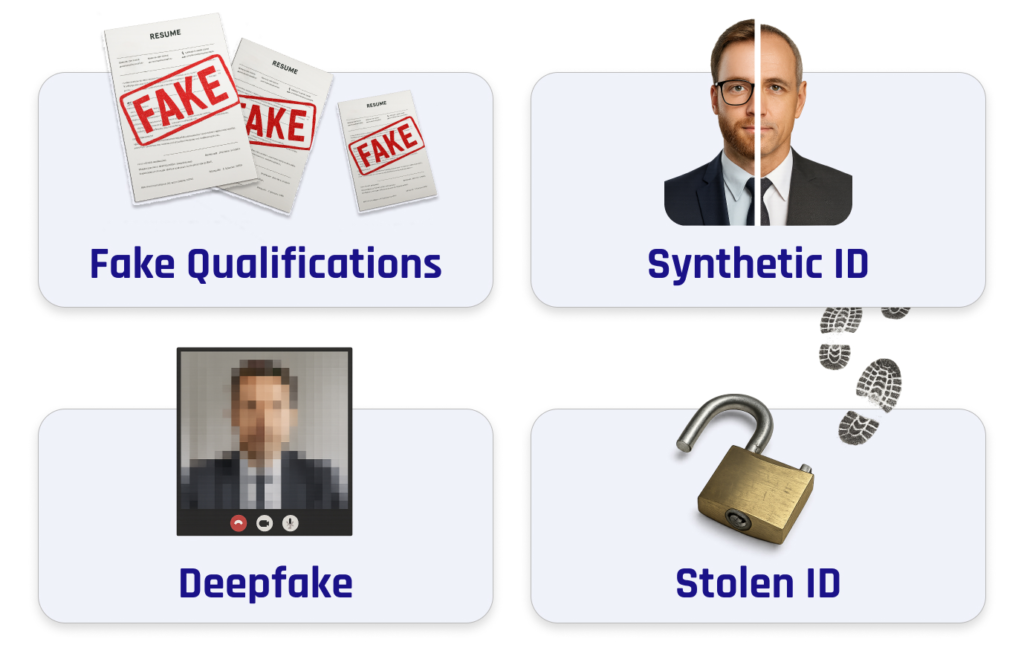
    • Deepfake video interviews
    • Stolen professional identities
    • Fake resumes generated by AI
    • Credential fraud
    • Employment history manipulation
    • Insider threat recruitment
    • State-sponsored infiltration attempts
    • Financial scam operations

    Many businesses assume background checks alone are enough.

    Unfortunately, modern hiring fraud often bypasses traditional verification methods.

    The Growing Risk of AI-Powered Hiring Fraud

    Artificial intelligence has made deception easier than ever.

    Attackers can now create:

    • Realistic video avatars
    • AI-generated voice cloning
    • Fabricated employment histories
    • Convincing online portfolios
    • Automated interview responses

    Some fraudsters even use live deepfake software during video interviews.

    Look, I get it, cybersecurity sounds like a headache, but allowing a fraudulent applicant into your company can create risks far beyond a bad hire.

    A single malicious employee can expose customer data, compromise cloud environments, and assist ransomware attackers from the inside.

    Common Red Flags During Remote Hiring

    Business owners should pay attention to warning signs throughout the recruitment process.

    Inconsistent Identity Information

    Watch for:

    • Different names across documents
    • Mismatched email addresses
    • Contradicting employment dates
    • Incomplete verification records

    Suspicious Communication Patterns

    Potential indicators include:

    • Refusal to appear on camera
    • Delayed responses during interviews
    • Scripted answers
    • Unusual audio quality

    Unverifiable Professional Profiles

    Review:

    • Employment history
    • Portfolio authenticity
    • Professional references
    • Social media consistency

    Technical Anomalies

    Fraudulent applicants may:

    • Frequently disable video
    • Use virtual camera software
    • Avoid real-time demonstrations
    • Display suspicious network behavior

    Security Checklist for Verifying Remote Job Applicants

    Verification StepPriorityRisk Reduction
    Government ID VerificationCriticalHigh
    Live Video InterviewCriticalHigh
    Reference ChecksHighMedium
    Employment VerificationCriticalHigh
    Skills AssessmentHighHigh
    Background ScreeningHighHigh
    MFA During OnboardingCriticalHigh
    Device Security ReviewMediumMedium
    Cloud Access RestrictionsCriticalHigh
    Ongoing MonitoringHighHigh

    Following this checklist significantly reduces hiring-related cyber risks.

    Best Ways to Verify the Identity of a Remote Job Applicant

    Conduct Multi-Step Identity Verification

    Never rely on a single verification method.

    Combine:

    • Government-issued ID checks
    • Video interviews
    • Employment verification
    • Reference validation

    Layered verification creates stronger protection.

    Require Live Video Interviews

    Live interaction remains one of the most effective fraud detection tools.

    Ask candidates to:

    • Turn on their camera
    • Present identification
    • Participate in real-time discussions

    Observe facial expressions and communication consistency.

    Verify Professional History Independently

    Do not rely solely on information provided by applicants.

    Contact:

    • Previous employers
    • Professional references
    • Educational institutions

    Confirm key details independently.

    Evaluate Digital Presence

    Legitimate professionals typically leave a digital footprint.

    Review:

    • Professional networking profiles
    • Industry participation
    • Published work
    • Portfolio projects

    However, absence alone should not be treated as evidence of fraud.

    Use Skills-Based Assessments

    Practical testing helps verify actual expertise.

    Applicants claiming advanced technical skills should demonstrate them through structured assessments.

    Step-by-Step Guide: Securing Microsoft 365 During Employee Onboarding

    Even verified applicants can become security risks if onboarding procedures are weak.

    Microsoft 365 remains one of the most widely used business platforms among remote organizations.

    Step 1: Create a Unique User Account

    Never reuse accounts.

    Assign each employee their own credentials.

    Step 2: Enable Multi-Factor Authentication

    Navigate to:

    Microsoft Entra Admin Center → Users

    Enable MFA immediately.

    Step 3: Apply Conditional Access Policies

    Restrict access based on:

    • Location
    • Device health
    • Login risk

    Step 4: Implement Least Privilege Access

    Provide only the permissions necessary for job responsibilities.

    Avoid granting administrator rights unnecessarily.

    Step 5: Configure Security Alerts

    Enable notifications for:

    • Unusual login activity
    • Permission changes
    • Failed authentication attempts

    Step 6: Enroll Company Devices

    Use device management tools to ensure compliance.

    Monitor:

    • Security updates
    • Encryption status
    • Endpoint protection

    Step 7: Restrict External Sharing

    Limit access to sensitive company resources until trust is established.

    Step 8: Conduct Security Awareness Training

    Teach new employees:

    • Phishing detection
    • Password security
    • Safe cloud practices

    Step 9: Monitor Early Activity

    Review:

    • Login behavior
    • File access patterns
    • Cloud usage

    Step 10: Schedule Access Reviews

    Regularly audit permissions to prevent unnecessary exposure.

    Remember, onboarding is an ongoing proccess, not a one-time event.

    Protecting Against Insider Threats

    Even legitimate employees can create cybersecurity risks.

    Some threats are accidental.

    Others are intentional.

    Limit Access to Sensitive Data

    Implement role-based access controls.

    Employees should access only what they need.

    Monitor User Activity

    Track:

    • File downloads
    • Permission changes
    • Data transfers
    • Administrative actions

    Implement Data Loss Prevention

    DLP solutions help prevent unauthorized sharing of confidential information.

    Ransomware Defense Starts with Hiring

    Many ransomware incidents begin with stolen credentials or insider access.

    Fraudulent applicants may seek employment specifically to:

    • Gather intelligence
    • Escalate privileges
    • Deploy malware
    • Facilitate extortion campaigns

    Strong identity verification serves as an important first line of defense.

    Cloud Security Considerations for Remote Teams

    Most modern businesses rely heavily on cloud services.

    Protecting cloud environments requires careful onboarding and verification practices.

    Require MFA Everywhere

    Protect:

    • Email accounts
    • Collaboration platforms
    • Cloud storage systems

    Monitor Login Locations

    Investigate:

    • Geographic anomalies
    • Impossible travel events
    • Repeated failed logins

    Review Third-Party Access

    Control integrations with external applications.

    Remove unnecessary permissions promptly.

    Common Mistakes Businesses Make

    Hiring Too Quickly

    Urgency often leads to shortcuts.

    Attackers exploit rushed recruitment processes.

    Trusting Documentation Alone

    Documents can be forged.

    Verification should always involve multiple methods.

    Ignoring Technical Warning Signs

    Video interview anomalies deserve investigation.

    Providing Excessive Access

    New hires should never receive unrestricted permissions immediately.

    Skipping Security Training

    Even qualified employees need cybersecurity awareness education.

    Here is the real talk about why your current password isn’t enough. If a fraudulent applicant gains access to your systems, even strong passwords may not stop them from abusing legitimate privileges once inside.

    Building a Secure Remote Hiring Framework

    The safest organizations treat hiring as part of their cybersecurity strategy.

    An effective framework includes:

    Pre-Hire Verification

    • Identity checks
    • Reference validation
    • Background screening

    Secure Onboarding

    • MFA deployment
    • Device enrollment
    • Access restrictions

    Continuous Monitoring

    • User activity reviews
    • Security alerts
    • Permission audits

    Employee Education

    • Phishing awareness
    • Data protection training
    • Incident reporting procedures

    Together, these controls create a powerful defense against modern hiring threats.

    Final Thoughts

    Understanding the best ways to verify the identity of a remote job applicant is essential for every small business operating in today’s digital environment. As AI-generated fraud, deepfake interviews, insider threats, and ransomware campaigns continue to evolve, organizations must strengthen their hiring security practices.

    A comprehensive verification process that combines identity validation, live interviews, employment verification, skills testing, secure onboarding, and ongoing monitoring significantly reduces risk. Even a small firewal misconfiguration or excessive cloud permissions can amplify the damage caused by a fraudulent hire.

    The businesses that thrive in 2026 will be those that view recruitment not only as a talent acquisition function but also as a critical cybersecurity control.

    Ready to strengthen your remote hiring security? Visit locknet.site today to access expert cybersecurity resources, perform a comprehensive security audit, subscribe to our security newsletter, and connect with specialists who can help protect your business from hiring fraud, insider threats, and emerging cyber risks.

  • Step-by-Step Guide to Setting Up a Secure VPN for Remote Employees in 2026

    Step-by-Step Guide to Setting Up a Secure VPN for Remote Employees in 2026

    Protect remote teams with a secure VPN setup, strong Encryption, Zero Trust access, and advanced Malware Protection in 2026.

    Remote work is no longer a temporary trend. In 2026, businesses across the world — especially small and growing companies — rely heavily on remote employees, cloud collaboration, and digital communication. While this flexibility improves productivity, it also creates serious cybersecurity risks.

    Hackers now target remote workers because home networks are often weaker than office environments. A single compromised laptop can expose company files, customer data, financial records, and internal communication within minutes.

    That’s why businesses urgently need a secure VPN strategy.

    If your remote team connects through public Wi-Fi, shared internet connections, or unsecured devices, your company is already vulnerable to data theft, ransomware attacks, and AI-driven phishing campaigns.

    Look, I get it, cybersecurity sounds like a headache, but setting up a secure VPN is one of the smartest things a business owner can do today.

    At locknet.site, we help entrepreneurs and small businesses create bulletproof remote work environments that protect both employees and sensitive company systems.

    Why VPN Security Matters More in 2026

    Cybercriminals have become more sophisticated than ever before. Modern attacks now use:

    • AI-generated phishing emails
    • Fake login portals
    • Session hijacking malware
    • Public Wi-Fi interception attacks
    • Cloud credential theft
    • Ransomware delivery systems

    Remote employees are often the weakest security link because they connect from:

    • Coffee shops
    • Airports
    • Shared workspaces
    • Home routers
    • Personal devices

    Without VPN Encryption, attackers can intercept internet traffic and steal:

    • Passwords
    • Customer information
    • Banking credentials
    • Internal company documents

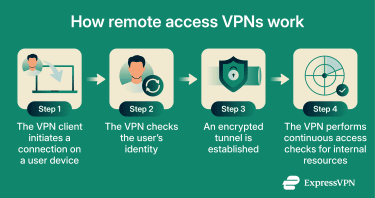
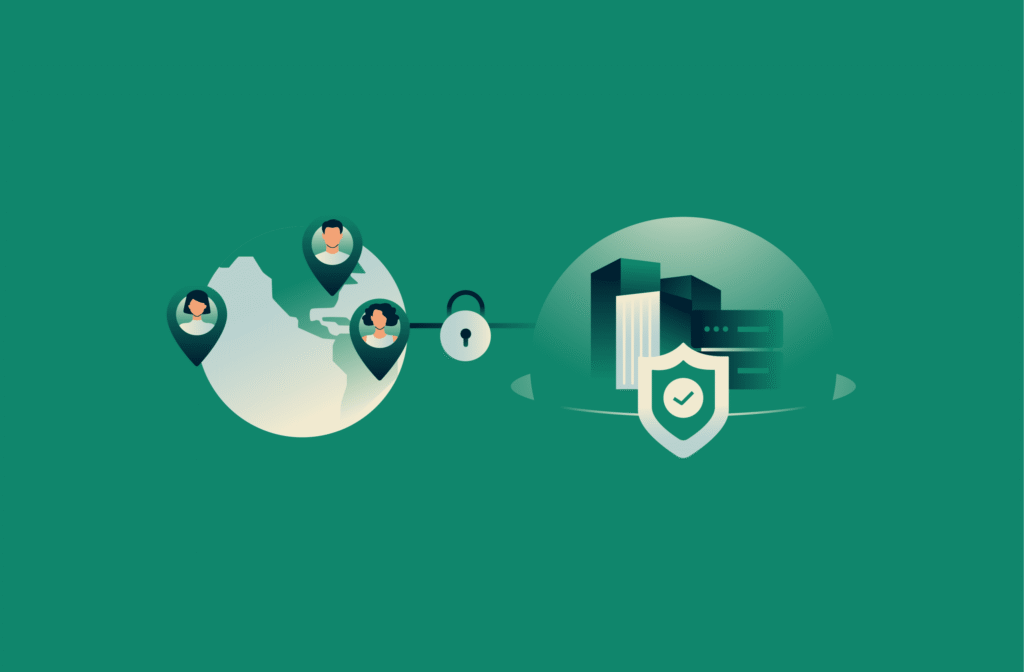
    A secure VPN creates an encrypted tunnel between employees and company systems, making it far harder for hackers to spy on or manipulate data.

    What Is a VPN and How Does It Work?

    A VPN, or Virtual Private Network, encrypts internet traffic and hides sensitive communication from attackers.

    Instead of employees connecting directly to business systems through public internet connections, the VPN creates a secure and encrypted route.

    This protects:

    • Remote access sessions
    • File transfers
    • Cloud dashboards
    • Business communication
    • Employee logins

    In modern Zero Trust security models, VPNs are often the first defense layer.

    Key Features Every Business VPN Should Have

    Not all VPNs are designed for business security. Small companies should choose VPN solutions with advanced protection features.

    Strong Encryption

    Always use VPNs that support:

    • AES-256 Encryption
    • WireGuard protocol
    • OpenVPN security

    Weak encryption can expose sensitive data.

    Multi-Factor Authentication

    VPN access should always require Two-Factor Authentication (2FA).

    Even if hackers steal passwords, they still cannot easily access the network.

    Centralized User Management

    Businesses need the ability to:

    • Add users
    • Remove employees quickly
    • Control permissions
    • Monitor suspicious logins

    Zero Trust Compatibility

    Modern VPN systems should support Zero Trust principles where every connection must be verified continuously.

    Malware Protection

    Some advanced VPN services now include:

    • DNS filtering
    • Threat blocking
    • Anti-phishing security
    • Malware scanning

    This provides extra protection against malicious websites.

    VPN vs Firewall Comparison Table

    FeatureVPNFirewall
    Encrypts internet trafficYesNo
    Blocks suspicious network trafficLimitedYes
    Protects remote workersYesPartial
    Hides user IP addressYesNo
    Stops unauthorized inbound trafficNoYes
    Supports Zero Trust accessYesYes
    Prevents ransomware spreadPartialStronger

    Businesses need both VPNs and firewal systems for complete protection.

    Step-by-Step Guide to Setting Up a Secure VPN for Remote Employees

    Here’s a practical step-by-step proccess small businesses can follow in 2026.

    Step 1: Choose a Business-Grade VPN Provider

    Avoid free consumer VPNs for company operations.

    Look for providers that support:

    • Business management dashboards
    • Encryption standards
    • Dedicated servers
    • Centralized controls
    • Two-Factor Authentication (2FA)

    Good VPN providers should also have strong privacy reputations and regular security audits.

    Step 2: Create Separate Employee Accounts

    Never allow shared VPN credentials.

    Each employee should receive:

    • Unique login credentials
    • Separate access permissions
    • Role-based restrictions

    This improves accountability and limits insider risks.

    Step 3: Enable Two-Factor Authentication (2FA)

    This is critical.

    Enable 2FA using:

    • Authenticator apps
    • Hardware security keys
    • Mobile verification

    Here is the real talk about why your current password isn’t enough: passwords alone are extremely vulnerable in 2026.

    AI-driven phishing attacks can easily steal login credentials.

    Step 4: Configure Zero Trust Access Rules

    Not every employee should access every system.

    Apply Zero Trust policies such as:

    • Location-based access controls
    • Device verification
    • Login behavior analysis
    • Restricted admin privileges

    This minimizes damage if accounts become compromised.

    Step 5: Secure Employee Devices

    Your VPN is only as secure as the device connecting to it.

    All employee devices should include:

    • Antivirus software
    • Malware Protection
    • Device Encryption
    • Firewall protection
    • Automatic updates

    Businesses should also block rooted or jailbroken devices from connecting.

    Step 6: Configure DNS Leak Protection

    A poorly configured VPN can accidentally expose browsing activity.

    Enable:

    • DNS leak protection
    • Kill switch features
    • Secure DNS routing

    These settings improve privacy and prevent accidental exposure.

    Step 7: Restrict Public Wi-Fi Usage

    Employees often work from public locations.

    Public Wi-Fi networks are dangerous because attackers can:

    • Intercept traffic
    • Inject malware
    • Create fake Wi-Fi hotspots

    Require employees to:

    • Use VPN connections immediately
    • Avoid unknown networks
    • Disable automatic Wi-Fi connections

    Step 8: Monitor VPN Activity

    Businesses should regularly review:

    • Login locations
    • Failed login attempts
    • Unusual connection times
    • Multiple simultaneous sessions

    Suspicious activity may indicate compromised accounts.

    Step 9: Implement Cloud Security Controls

    Most remote businesses now use:

    • Google Workspace
    • Microsoft 365
    • Slack
    • Zoom
    • Cloud storage platforms

    VPN access should integrate with secure cloud management policies.

    Use:

    • Conditional Access
    • Encryption
    • Access logging
    • Device trust verification

    This strengthens cloud security significantly.

    Step 10: Train Employees Regularly

    Technology alone cannot stop cyberattacks.

    Employees should learn how to identify:

    • Fake VPN login pages
    • AI-generated phishing emails
    • Malware attachments
    • Suspicious remote-access requests
    • Credential theft attempts

    Human awareness is one of the strongest security defenses available.

    Common VPN Security Mistakes Businesses Make

    Using Weak Passwords

    Passwords like:

    • company123
    • admin786
    • welcome123

    are still surprisingly common.

    Your putting your company at risk with weak credentials.

    Ignoring Software Updates

    Outdated VPN software may contain vulnerabilities hackers can exploit.

    Always enable automatic updates.

    Allowing Personal Devices Without Security Checks

    Unmanaged devices create major exposure risks.

    Businesses should enforce device security standards before VPN access is granted.

    No Access Logging

    Without monitoring, businesses may never notice suspicious behavior until it’s too late.

    Relying Only on VPN Protection

    A VPN is important, but it is not a complete cybersecurity strategy.

    Businesses still need:

    • Firewalls
    • Endpoint security
    • Secure backups
    • Malware Protection
    • Encryption
    • Employee training

    AI-Driven Threats and Remote Work Risks

    The 2026 threat landscape is extremely aggressive.

    Cybercriminals now use AI to:

    • Mimic employee writing styles
    • Create fake support messages
    • Clone company branding
    • Launch automated phishing campaigns
    • Identify weak remote users

    Small businesses are especially vulnerable because attackers know many lack advanced cybersecurity teams.

    That’s why remote security must be proactive, not reactive.

    Building a Secure Remote Work Culture

    A strong cybersecurity culture matters just as much as technology.

    Businesses should encourage:

    • Immediate reporting of suspicious activity
    • Strong password habits
    • Secure file sharing
    • Responsible device usage
    • Continuous security awareness

    Even the best VPN cannot fully protect careless behavior.

    Final Thoughts

    A secure VPN is no longer optional for remote businesses in 2026. It is a critical defense layer against ransomware, phishing attacks, cloud compromise, and data theft.

    The right VPN setup protects:

    • Employee communication
    • Customer information
    • Financial records
    • Cloud platforms
    • Business reputation

    But remember, VPN security works best when combined with:

    • Encryption
    • Two-Factor Authentication (2FA)
    • Zero Trust access
    • Malware Protection
    • Firewall security
    • Employee training

    At locknet.site, we help businesses secure remote teams, strengthen cloud environments, and defend against modern cyber threats before attackers exploit weak points. Audit your remote work security today, subscribe to expert cybersecurity insights, or consult with specialists who understand the dark side of the modern internet.

  • Best Free Antivirus for Small Businesses in Pakistan 2026: Stay Safe from Modern Cyber Threats

    Best Free Antivirus for Small Businesses in Pakistan 2026: Stay Safe from Modern Cyber Threats

    Protect your business in 2026 with the best free antivirus tools against ransomware, phishing, and AI-powered cyberattacks.

    In 2026, small businesses in Pakistan are facing a completely different kind of cyber threat landscape. Hackers are no longer just targeting multinational corporations or banks. Today, even a small e-commerce store, travel agency, software house, clinic, or local startup can become a victim of ransomware, phishing scams, or cloud account hijacking within minutes.

    Cybercriminals know that small businesses often lack dedicated IT teams and advanced security budgets. That makes them easier targets.

    Look, I get it, cybersecurity sounds like a headache, but ignoring it is one of the biggest risks a business owner can take today. One malicious email attachment or fake login page can lock your systems, expose customer records, and destroy years of trust.

    That’s exactly why finding the best free antivirus for small businesses in Pakistan 2026 is more important than ever.

    At locknet.site, we help entrepreneurs build secure and resilient digital systems that can survive modern cyber threats without spending thousands on enterprise-level software.

    Why Small Businesses in Pakistan Are Prime Targets in 2026

    The cybersecurity landscape has evolved rapidly. Modern attackers now use AI-driven phishing emails, fake invoices, deepfake voice messages, and automated malware campaigns to target businesses.

    Small companies are especially vulnerable because many still rely on:

    • Weak passwords
    • Shared employee accounts
    • Pirated software
    • Unsecured Wi-Fi networks
    • Outdated operating systems
    • No backup strategy

    In Pakistan, remote work and cloud collaboration tools have also become common. Businesses now use:

    • Microsoft 365
    • Google Workspace
    • WhatsApp Business
    • Cloud storage
    • Remote desktop software
    • Online banking apps

    While these technologies improve productivity, they also increase exposure to cyberattacks.

    Here is the real talk about why your current password isn’t enough: hackers rarely guess passwords anymore. They steal them through phishing pages, malware, browser session theft, and leaked databases.

    That’s why antivirus software alone is not enough anymore. Businesses also need:

    • Encryption
    • Two-Factor Authentication (2FA)
    • Zero Trust access controls
    • Cloud backup protection
    • Endpoint Malware Protection

    What Makes the Best Free Antivirus in 2026?

    Modern antivirus software must do much more than detect simple viruses.

    The best free antivirus for small businesses in Pakistan 2026 should provide layered security capable of stopping advanced attacks.

    Real-Time Malware Protection

    Real-time scanning blocks malicious files before they execute.

    AI-Based Threat Detection

    Modern antivirus tools analyze suspicious behavior patterns, not just known malware signatures.

    Ransomware Protection

    Ransomware attacks are now one of the biggest threats to small businesses. Good antivirus software should stop unauthorized file encryption attempts.

    Phishing Defense

    AI-generated phishing emails look incredibly realistic in 2026. Antivirus solutions must block dangerous links and fake websites.

    Cloud Security Features

    Businesses using Microsoft 365 or Google Workspace need security for cloud-based workflows and remote teams.

    Lightweight Performance

    Many Pakistani businesses still use older laptops or mid-range PCs. Heavy antivirus programs can slow systems badly.

    Best Free Antivirus for Small Businesses in Pakistan 2026

    1. Microsoft Defender

    Microsoft Defender has improved significantly over the past few years and is now one of the strongest free security solutions for Windows users.

    Key Features

    • Real-time Malware Protection
    • Built-in firewall integration
    • Phishing protection
    • Ransomware monitoring
    • Cloud-assisted threat intelligence

    Best For

    • Startups
    • Small offices
    • Businesses using Windows 11

    Its biggest advantage is simplicity because it comes pre-installed on most modern Windows systems.

    Weakness

    Advanced centralized management options are limited for larger teams.

    Still, it provides excellent baseline security for small companies.

    2. Bitdefender Antivirus Free

    Bitdefender is widely respected for its strong malware detection engine and lightweight performance.

    Why Businesses Prefer It

    • Excellent ransomware defense
    • Strong phishing protection
    • Fast system scans
    • Minimal performance impact

    This is a great choice for businesses handling customer records or payment information.

    3. Avast Free Antivirus

    Avast offers several extra tools beyond standard antivirus protection.

    Features

    • Wi-Fi vulnerability scanning
    • Browser protection
    • Email scanning
    • Ransomware Shield
    • Suspicious activity monitoring

    This makes Avast useful for offices with multiple connected devices.

    Weakness

    Some users dislike the upgrade popups.

    4. Kaspersky Free

    Kaspersky remains highly effective against sophisticated malware attacks.

    Strong Areas

    • Banking malware protection
    • Excellent phishing detection
    • AI-assisted security
    • Fast performance

    Especially useful for financial businesses and accounting firms.

    5. Avira Free Security

    Avira combines antivirus protection with privacy and optimization tools.

    Features

    • VPN support
    • Password manager
    • Browser privacy protection
    • Malware scanning
    • Tracking blockers

    Good option for remote employees and hybrid teams.

    Antivirus Comparison Table for Pakistani SMEs

    AntivirusRansomware ProtectionPhishing DefenseLightweightBest For
    Microsoft DefenderGoodGoodExcellentWindows offices
    Bitdefender FreeExcellentExcellentExcellentSmall businesses
    Avast FreeVery GoodVery GoodGoodMulti-device teams
    Kaspersky FreeExcellentExcellentGoodFinancial operations
    Avira FreeGoodVery GoodGoodRemote workers

    Antivirus Alone Cannot Fully Protect Your Business

    This is where many business owners make a dangerous mistake.

    They install antivirus software and assume everything is secure.

    That approach no longer works in 2026.

    Cybersecurity today requires multiple layers of protection working together.

    Essential Cybersecurity Layers Every Small Business Needs

    Two-Factor Authentication (2FA)

    Enable 2FA on:

    • Gmail
    • Banking apps
    • Microsoft 365
    • WhatsApp Business
    • Cloud dashboards

    Even if hackers steal passwords, they still cannot easily access accounts.

    Encryption

    Encryption protects sensitive information even if a device gets stolen.

    Businesses should encrypt:

    • Customer databases
    • Contracts
    • Employee records
    • Financial files

    Zero Trust Security

    Zero Trust means no user or device should automatically be trusted.

    Every login and device request must be verified.

    This dramatically reduces insider threats and remote-access abuse.

    Secure Backup Systems

    Businesses should maintain:

    • Cloud backups
    • Offline backups
    • Recovery testing

    A ransomware attack without backups can completely destroy operations.

    Employee Awareness Training

    Most cyberattacks begin with human error.

    Employees should learn how to identify:

    • Fake invoices
    • Suspicious links
    • AI-generated phishing emails
    • QR-code scams
    • Malicious USB devices

    Step-by-Step Guide: Securing Microsoft 365 for Small Businesses

    Microsoft 365 remains one of the most targeted business platforms in the world.

    Here’s a practical proccess for improving security.

    Step 1: Enable Multi-Factor Authentication

    • Login to Microsoft Admin Center
    • Open Users section
    • Select Active Users
    • Enable MFA for every account

    This blocks many account takeover attempts instantly.

    Step 2: Disable Legacy Authentication

    Older login systems are easier for attackers to exploit.

    Disable:

    • POP3
    • IMAP
    • Old SMTP authentication

    Step 3: Turn On Anti-Phishing Protection

    Inside Microsoft Defender:

    • Enable Safe Links
    • Enable Safe Attachments
    • Activate spoof intelligence

    These features help stop AI-generated phishing attacks.

    Step 4: Limit Admin Access

    Only trusted staff should have administrator privileges.

    Too many admin accounts increase security risks.

    Step 5: Configure Conditional Access Policies

    Apply Zero Trust security by restricting access based on:

    • Device type
    • Country
    • Login behavior
    • Risk level

    Step 6: Enable Email Encryption

    Use encrypted email settings for:

    • Financial communication
    • Customer information
    • Internal contracts

    This adds another important defense layer.

    Common Cybersecurity Mistakes Small Businesses Still Make

    Using Pirated Software

    Pirated systems often contain hidden malware or backdoors.

    This remains one of the biggest infection sources in South Asia.

    Weak Password Habits

    Passwords like:

    • admin123
    • pakistan786
    • company123

    are still extremely common.

    Your exposing your business to serious risk with weak passwords.

    Ignoring Mobile Security

    Employees frequently access business systems from smartphones.

    Without proper mobile Malware Protection, attackers can steal sessions and sensitive data.

    No Backup Testing

    Many companies create backups but never test recovery.

    A backup that cannot restore correctly is useless.

    Shared Employee Accounts

    Shared accounts reduce accountability and create unnecessary exposure.

    Every employee should have separate credentials.

    AI-Driven Cyber Threats Are Evolving Fast

    Cybercriminals now use artificial intelligence to:

    • Generate convincing phishing emails
    • Clone writing styles
    • Create fake invoices
    • Automate malware deployment
    • Mimic internal business communication

    Small businesses are particularly vulnerable because they usually lack dedicated security teams.

    That’s why prevention matters more than expensive recovery.

    Building a Cybersecurity Culture

    Technology is important, but employee habits matter even more.

    Businesses should encourage:

    • Fast reporting of suspicious activity
    • Strong password hygiene
    • Secure remote work practices
    • Regular security training
    • Responsible data handling

    Even the best antivirus software cannot fully protect careless users.

    Final Thoughts

    Choosing the best free antivirus for small businesses in Pakistan 2026 is not just about downloading software. It’s about building a complete cybersecurity strategy that protects your company from ransomware, phishing attacks, cloud threats, and AI-powered scams.

    For many businesses:

    • Microsoft Defender offers strong built-in protection
    • Bitdefender delivers lightweight and powerful security
    • Avast adds useful network defense tools
    • Kaspersky provides excellent malware detection
    • Avira supports remote teams effectively

    But remember, antivirus software is only one part of modern cybersecurity.

    You also need:

    • Encryption
    • Two-Factor Authentication (2FA)
    • Zero Trust security
    • Secure cloud backups
    • Employee awareness training
    • Strong Malware Protection practices

    Visit locknet.site today to audit your digital security, subscribe to expert cybersecurity updates, and consult professionals who can help your business build a bulletproof online presence before the next cyberattack strikes.

  • How to prepare for CSS exams while doing a full-time job

    How to prepare for CSS exams while doing a full-time job

    Learn how to prepare for CSS exams while doing a full-time job in Pakistan with smart study plans, time management, and FPSC prep strategies.

    How to Prepare for CSS Exams While Doing a Full-Time Job and Build a Strong Career in Pakistan

    If you are wondering how to prepare for CSS exams while doing a full-time job, first of all, know this: thousands of Pakistani professionals are fighting the same battle every single day.

    Some are working 9-to-5 in Lahore’s software houses. Others are managing bank jobs in Karachi or corporate offices in Islamabad while secretly chasing the dream of becoming a CSP officer through the Federal Public Service Commission.

    And honestly? It is hard.

    But it is absolutely possible.

    Look, I get it, finding a stable career in Pakistan feels like a full-time job itself, but preparing for CSS while earning a living can actually become your biggest strength. Working professionals often develop better discipline, communication skills, and maturity compared to full-time students.

    In 2026, Pakistan’s job market is changing rapidly. Remote jobs in Pakistan are increasing, e-commerce startups are hiring aggressively, Green Tech industries are expanding, and employers now value soft skills more than ever before. At the same time, competition for government jobs through FPSC and PPSC has become even tougher.

    That means smart preparation matters more than endless studying.

    This detailed guide by pathpk.xyz will show you exactly how to prepare for CSS exams while managing a full-time job without burning out.

    Why CSS Still Matters in Pakistan in 2026

    Many young professionals ask whether CSS is still worth it in the age of freelancing and remote work.

    The short answer is yes.

    Despite the growth of private industries, CSS remains one of the most respected career paths in Pakistan because it offers:

    • Job security
    • Authority and leadership roles
    • Strong pension structure
    • Social prestige
    • National-level impact
    • Career growth opportunities

    In cities like Lahore, Karachi, and Islamabad, private-sector salaries may sometimes look attractive initially, but long-term career stability in civil services still attracts thousands of ambitious candidates every year.

    At the same time, professionals working in industries like:

    • E-commerce
    • Digital marketing
    • Banking
    • IT
    • Telecom
    • Green energy
    • Supply chain management

    are increasingly attempting CSS because they already possess workplace maturity and communication experience.

    The Biggest Challenge: Time Management

    The real problem is not intelligence.

    It is energy.

    After an exhausting office shift, your brain simply refuses to open books. This is where most candidates fail.

    Here is the real talk about why your preparation collapses: you are probably trying to study like a full-time student while living the life of a working adult.

    That approach never works.

    Instead, working professionals need a “strategic preparation system.”

    Step-by-Step Guide: How to Prepare for CSS Exams While Doing a Full-Time Job

    Step 1: Accept That Your Preparation Will Be Different

    A full-time employee cannot study 10 hours daily.

    Stop comparing yourself to academy students.

    Your advantage is consistency, not volume.

    Even 3 focused hours daily for 12 months can beat random 10-hour study sessions.

    A realistic target is:

    • Weekdays: 2–4 hours
    • Weekends: 6–8 hours

    Consistency beats motivation every single time.

    Step 2: Choose Optional Subjects Strategically

    Many candidates select subjects emotionally instead of strategically.

    Bad idea.

    Your optional subjects should match:

    • Your academic background
    • Interest level
    • Scoring trends
    • Available study material
    • Time availability

    For example:

    • Working in banking? Consider Public Administration or Accounting.
    • IT professional? Computer Science may help.
    • Strong reading habits? International Relations could suit you.

    Do not select a subject just because someone on YouTube called it “high scoring.”

    Step 3: Build a 12-Month Study Roadmap

    Here is a practical CSS preparation roadmap for working professionals.

    TimelineFocus AreaDaily Hours
    Months 1-2Syllabus understanding + optional selection2 hours
    Months 3-5Core subjects preparation3 hours
    Months 6-7Essay & Precis practice3-4 hours
    Months 8-9Current affairs + Pakistan affairs3 hours
    Months 10-11Revision + mock tests4 hours
    Month 12Past papers + weak areas5 hours

    This proccess helps prevent burnout while maintaining steady progress.

    Best Study Routine for Working Professionals

    Morning Study Sessions Work Better

    Most successful CSS officers recommend early morning study.

    Why?

    Because after office hours:

    • Mental fatigue increases
    • Social distractions start
    • Motivation drops

    Try this:

    • Wake up at 5 AM
    • Study until 7 AM
    • Go to work
    • Revise lightly at night

    Morning learning retention is usually stronger.

    Use Dead Time Wisely

    Your commute can become a classroom.

    Listen to:

    • Podcasts
    • Current affairs discussions
    • English vocabulary audio
    • YouTube lectures

    Small daily improvements create massive long-term results.

    Skills Every CSS Aspirant Must Develop in 2026

    The modern FPSC exam is no longer just about memorization.

    It now evaluates:

    • Analytical thinking
    • Communication ability
    • Emotional intelligence
    • Leadership mindset
    • Writing clarity

    Important Skills Roadmap

    SkillWhy It Matters
    English WritingCritical for Essay & Precis
    Current Affairs AnalysisImportant for interviews
    Soft SkillsHelps in psychological assessment
    Time ManagementEssential for working candidates
    Digital AwarenessIncreasingly important in governance
    Public SpeakingUseful for viva preparation

    Soft skills are becoming especially important because Pakistan’s governance system is slowly adapting to global administrative standards.

    How Remote Work Can Help CSS Preparation

    One hidden advantage in 2026 is the rise of remote jobs in Pakistan.

    Many professionals now work:

    • Hybrid schedules
    • Freelance contracts
    • Fully remote roles

    This flexibility gives CSS aspirants extra preparation time.

    Industries currently offering remote work include:

    • Software development
    • SEO
    • Digital marketing
    • Content writing
    • Customer support
    • Graphic design
    • E-commerce management

    If your current job completely destroys your study schedule, transitioning to remote work may actually improve your FPSC prep significantly.

    The Best Resources for CSS Preparation

    You do not need expensive academies to succeed.

    Many toppers now combine:

    • YouTube lectures
    • Online PDFs
    • Past papers
    • Current affairs journals
    • Digital note-taking apps

    However, mentorship still matters.

    That is why platforms like pathpk.xyz are becoming valuable for Pakistani students and professionals searching for career counseling Lahore/Karachi guidance, CSS direction, and realistic preparation strategies.

    Common Mistakes Working Professionals Make

    Studying Without a Schedule

    Random study patterns destroy consistency.

    Your timetable should be realistic, not motivational.

    Ignoring Essay Writing

    This is probably the biggest mistake.

    Many candidates spend months memorizing facts but fail the essay paper because they never practiced structured writing.

    Write one essay weekly minimum.

    Following Too Many Teachers

    Stop collecting resources endlessly.

    Choose:

    • One mentor
    • One current affairs source
    • One strategy

    And stick to it.

    Neglecting Health

    Poor sleep destroys memory retention.

    Your body is part of your preparation system.

    Exercise matters.

    Hydration matters.

    Even walking daily improves focus dramatically.

    Balancing Family, Work, and CSS Preparation

    Pakistani professionals often carry family responsibilities alongside office pressure.

    This makes preparation emotionally exhausting.

    If possible:

    • Inform family about your study schedule
    • Reduce unnecessary gatherings temporarily
    • Protect your study hours seriously

    You do not need isolation.

    You need boundaries.

    Even two uninterrupted hours daily can become a life-changing oppurtunity.

    How Recruiters View CSS Aspirants

    Interestingly, even if someone does not clear CSS, the preparation itself improves employability.

    Why?

    Because CSS aspirants often develop:

    • Better communication
    • Stronger analytical thinking
    • Current affairs awareness
    • Leadership confidence

    These qualities are highly valued in:

    • Corporate jobs
    • NGOs
    • Development sector
    • Public policy organizations
    • International agencies

    In cities like Islamabad especially, employers increasingly appreciate candidates who show intellectual discipline and national awareness.

    PPSC/FPSC Prep Alongside Career Growth

    Many candidates focus only on CSS while ignoring parallel opportunities.

    That is risky.

    A smart strategy includes:

    • CSS preparation
    • PPSC/FPSC prep
    • Skill development
    • LinkedIn optimization
    • Remote work experience

    This creates multiple career pathways instead of depending entirely on one exam.

    In today’s Pakistani economy, flexibility is survival.

    Final Motivation for Working Professionals

    If you are reading this after a long office shift, tired and confused about your future, remember this:

    You are not behind.

    Your journey is simply different.

    Some people have full-time study schedules.

    You have real-world experience.

    That experience can become your biggest advantage in the CSS journey if you remain disciplined and patient.

    There will be days when you feel exhausted.

    There will be moments when your friends move ahead faster.

    But one focused year can completely transform your life and career direction.

    And yes, your hard work absolutely can pay off.

    Final CTA

    Start today.

    Update your CV. Build a realistic CSS study timetable. Improve your English writing skills. Explore remote jobs in Pakistan that give you better work-life balance. Join serious study communities and stay connected with mentors who understand the Pakistani job market.

    Most importantly, visit pathpk.xyz regularly for career guidance, FPSC updates, skill development strategies, and daily opportunities designed specifically for Pakistani students and professionals searching for their true career path.