Protect Your Business Before Disaster Strikes: How to Create a Secure Disaster Recovery Plan on a Budget
Learn how to create a secure disaster recovery plan on a budget and keep your business running during cyberattacks, outages, and emergencies.
Every business owner believes disaster won’t happen to them—until it does.
A ransomware attack encrypts critical files. A cloud account gets compromised. An employee accidentally deletes important data. A server fails unexpectedly. A natural disaster interrupts operations. Suddenly, a thriving business finds itself scrambling to recover.
In 2026, disaster recovery is no longer a concern reserved for large enterprises. Small businesses face increasing threats from AI-powered phishing attacks, ransomware campaigns, cloud service disruptions, insider threats, and infrastructure failures. Unfortunately, many organizations assume disaster recovery requires massive budgets and dedicated IT departments.
That assumption is costly.
The reality is that every small business can build an effective and secure disaster recovery strategy without spending a fortune.
Understanding how to create a secure disaster recovery plan on a budget is one of the smartest investments a business can make. A well-designed plan reduces downtime, protects revenue, preserves customer trust, and ensures business continuity when unexpected events occur.
At locknet.site, we help entrepreneurs build a bulletproof digital presence that can withstand modern cyber threats and operational disruptions. This guide explains how to create a practical, affordable disaster recovery plan designed for today’s digital business environment.
What Is a Disaster Recovery Plan?
A disaster recovery plan (DRP) is a documented strategy that helps an organization restore systems, data, and operations after an unexpected disruption.
The goal is simple:
Restore critical business functions as quickly and safely as possible.
Disasters can include:
- Ransomware attacks
- Data breaches
- Hardware failures
- Cloud outages
- Human error
- Natural disasters
- Power failures
- Network disruptions
A disaster recovery plan ensures your business can continue operating even when things go wrong.
Why Disaster Recovery Matters More in 2026
Cybersecurity risks continue to evolve.
Today’s attackers use:
- AI-generated phishing campaigns
- Automated credential theft
- Cloud infrastructure targeting
- Supply chain attacks
- Ransomware-as-a-Service platforms
At the same time, businesses increasingly rely on:
- Cloud storage
- Remote teams
- SaaS applications
- Digital communications
This creates more opportunities for disruptions.
Without preparation, recovery can become expensive, chaotic, and time-consuming.
Common Misconceptions About Disaster Recovery
Many small businesses delay planning because of common myths.
“We Are Too Small to Be Targeted”
Cybercriminals frequently target small businesses because security controls are often weaker.
“Cloud Services Handle Everything”
Cloud providers secure infrastructure, but businesses remain responsible for protecting their own data and access controls.
“Backups Are Enough”
Backups are important, but recovery planning involves much more than storing copies of files.
“Disaster Recovery Is Expensive”
Effective planning can be achieved with affordable tools and disciplined processes.
Vulnerability Assessment: What Could Disrupt Your Business?
Before building a plan, identify potential risks.
Cyberattacks
Examples include:
- Ransomware
- Credential theft
- Malware infections
- Business email compromise
Human Error
Employees may accidentally:
- Delete files
- Misconfigure systems
- Share sensitive data
Hardware Failures
Computers, storage devices, and networking equipment eventually fail.
Cloud Service Interruptions
Even major cloud providers experience outages.
Natural Events
Floods, storms, fires, and power failures can impact operations.
Understanding these risks helps prioritize recovery efforts.
Comparison Table: Businesses With vs Without Disaster Recovery Plans
| Area | Without Recovery Plan | With Recovery Plan |
|---|---|---|
| Downtime | Extended | Reduced |
| Data Loss | Significant Risk | Minimized |
| Customer Trust | Easily Damaged | Better Protected |
| Recovery Costs | Higher | Lower |
| Business Continuity | Uncertain | Structured |
| Regulatory Compliance | Difficult | Easier |
This comparison illustrates why preparation matters.
Key Components of a Budget-Friendly Disaster Recovery Plan
Even small organizations should include several essential elements.
Asset Inventory
Document:
- Devices
- Servers
- Applications
- Cloud services
- Critical files
You cannot recover assets you haven’t identified.
Backup Strategy
Create reliable backups for:
- Business documents
- Databases
- Customer information
- Financial records
Recovery Priorities
Not all systems are equally important.
Determine which resources must be restored first.
Incident Response Procedures
Define who performs specific recovery tasks.
Communication Plans
Prepare communication methods for:
- Employees
- Customers
- Vendors
Security Controls
Recovery efforts should not introduce new vulnerabilities.
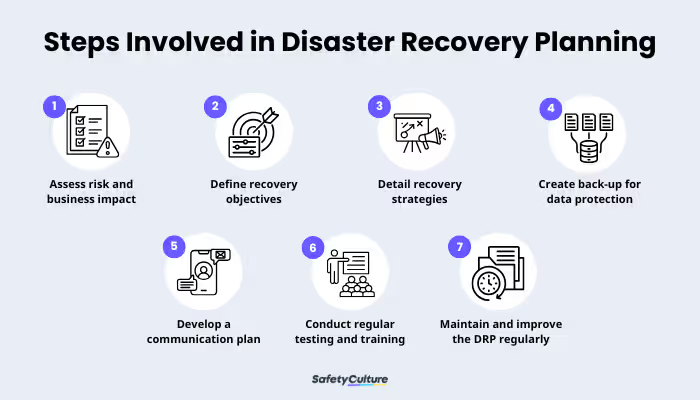
Step-by-Step Guide: How to Create a Secure Disaster Recovery Plan on a Budget
The following framework works for most small businesses.
Step 1: Identify Critical Business Functions
Ask:
- What systems generate revenue?
- Which applications are essential?
- Which files are irreplaceable?
Focus on protecting the most important assets first.
Step 2: Define Recovery Objectives
Establish:
- Recovery Time Objective (RTO)
- Recovery Point Objective (RPO)
These metrics determine how quickly systems must be restored and how much data loss is acceptable.
Step 3: Create an Asset Inventory
Document:
- Devices
- Software
- Cloud platforms
- User accounts
Maintain this inventory regularly.
Step 4: Implement the 3-2-1 Backup Strategy
Store:
- 3 copies of important data
- On 2 different media types
- With 1 copy stored offsite
This remains one of the most effective recovery strategies.
Step 5: Protect Backup Systems
Backup repositories should include:
- Encryption
- MFA
- Access restrictions
Attackers increasingly target backups during ransomware incidents.
Step 6: Document Recovery Procedures
Create step-by-step instructions for restoring:
- Files
- Systems
- User access
- Cloud services
Clear documentation reduces confusion.
Step 7: Assign Responsibilities
Every recovery task should have an owner.
Avoid assumptions.
Step 8: Test the Plan
A recovery plan that has never been tested is simply a document.
Conduct regular exercises.
Step-by-Step Guide: Securing Cloud-Based Backups
Many small businesses rely on cloud backup solutions.
Follow this proccess to strengthen security.
Step 1: Enable Multi-Factor Authentication
Require MFA for backup accounts.
Step 2: Encrypt Backup Data
Protect backups both in transit and at rest.
Step 3: Restrict Administrative Access
Limit privileges to authorized personnel.
Step 4: Monitor Backup Activity
Review:
- Login attempts
- Configuration changes
- Restore requests
Step 5: Test Restorations Regularly
Verify that backups can actually be restored.
Many organizations discover backup failures too late.
Step 6: Store Offline Copies
Offline backups provide additional ransomware protection.
Step 7: Audit Access Quarterly
Remove unnecessary permissions promptly.
Defense Layers for Modern Disaster Recovery
Recovery planning should incorporate multiple security layers.
Strong Authentication
Enable:
- MFA
- Passkeys
- Password managers
Here is the real talk about why your current password isn’t enough.
A strong password alone cannot stop many modern credential theft attacks.
Endpoint Protection
Protect recovery devices with:
- Antivirus software
- Device encryption
- Threat detection systems
Cloud Security Controls
Apply:
- Least-privilege access
- Activity monitoring
- Security alerts
Network Security
A properly configured firewal helps prevent unauthorized access during normal operations and recovery activities.
Security Awareness Training
Employees should recognize:
- Phishing attempts
- Fake recovery emails
- Social engineering attacks
Look, I get it, cybersecurity sounds like a headache, but many disasters begin with a single employee clicking the wrong link.
Recovery Plan Template for Small Businesses
A simple disaster recovery framework should answer:
What Happened?
Identify the nature of the incident.
What Systems Are Affected?
Determine impacted resources.
What Must Be Restored First?
Prioritize essential operations.
Who Is Responsible?
Assign clear ownership.
How Will Recovery Be Performed?
Follow documented procedures.
How Will Stakeholders Be Informed?
Maintain communication throughout recovery.
Security Checklist for Budget-Friendly Disaster Recovery
| Security Control | Required |
|---|---|
| Asset Inventory Created | Yes |
| Critical Systems Identified | Yes |
| Backup Strategy Implemented | Yes |
| Offsite Backup Available | Yes |
| MFA Enabled | Yes |
| Backup Encryption Enabled | Yes |
| Recovery Procedures Documented | Yes |
| Recovery Testing Conducted | Yes |
| Security Monitoring Active | Recommended |
| Employee Training Completed | Recommended |
Common Disaster Recovery Mistakes
Not Testing Backups
Many businesses assume backups work without verification.
Storing All Backups in One Location
A single failure can affect all copies.
Ignoring Cloud Security
Cloud services require proper configuration and monitoring.
Failing to Document Procedures
Recovery becomes slower when knowledge exists only in employees’ heads.
Overlooking Remote Workers
Remote teams must be included in recovery planning.
Delaying Security Improvements
Recovery planning should evolve alongside business growth.
Your disaster recovery strategy is only as effective as its weakest component.
How Disaster Recovery Supports Ransomware Defense
Modern ransomware attacks often target:
- Production systems
- Backup repositories
- Cloud environments
A secure recovery plan reduces leverage for attackers.
Organizations with strong backups and tested recovery procedures are less likely to pay ransom demands.
This significantly improves resilience.
Final Thoughts
Understanding how to create a secure disaster recovery plan on a budget is one of the most valuable investments a small business can make in 2026. As AI-powered phishing attacks, ransomware campaigns, cloud disruptions, and operational failures continue to increase, organizations must prepare for the unexpected.
The good news is that effective disaster recovery does not require enterprise-sized budgets. By identifying critical assets, implementing secure backups, documenting recovery procedures, testing systems regularly, and strengthening cybersecurity controls, businesses can dramatically improve resilience while controlling costs.
At locknet.site, we help entrepreneurs and growing organizations build secure digital foundations capable of surviving modern cyber threats and operational disruptions. A disaster recovery plan is not merely a technical document—it is a business survival strategy.
Ready to strengthen your resilience? Conduct a disaster recovery audit, subscribe to the latest cybersecurity insights from locknet.site, and consult a security specialist today before the next unexpected disruption puts your business at risk.
Leave a Reply