Protect Your Business Data Before It Ends Up in the Wrong Hands: Best Practices for Disposing of Old Business Hard Drives Safely
Safely dispose of old business hard drives and prevent data leaks, compliance violations, and cybercriminal access in 2026.
Most business owners spend significant time protecting their data while it is actively being used. They invest in antivirus software, firewalls, cloud security, multi-factor authentication, and employee training. However, one critical cybersecurity risk is often overlooked: what happens when old hard drives reach the end of their life.
In 2026, cybercriminals are not only targeting live systems. They are actively searching for discarded storage devices that may still contain valuable information. An improperly disposed hard drive can expose customer records, financial documents, intellectual property, employee information, passwords, and confidential business communications.
The truth is simple: deleting files is not enough.
Understanding the best practices for disposing of old business hard drives safely is essential for protecting your organization from data breaches, regulatory penalties, and reputational damage.
At locknet.site, we help entrepreneurs and small businesses build a bulletproof digital presence from end to end. That includes securing information throughout its entire lifecycle—from creation and storage to final disposal.
This guide explains how to securely retire hard drives, prevent data recovery, and ensure your business remains protected even after equipment leaves your office.
Why Hard Drive Disposal Matters in 2026
Many businesses replace:
- Desktop computers
- Laptops
- Servers
- Backup systems
- External drives
- Network storage devices
every few years.
Unfortunately, old devices often contain years of sensitive information.
Cybercriminals know that discarded hardware may still include:
- Customer databases
- Payroll information
- Tax records
- Contracts
- Login credentials
- Proprietary business data
Even damaged drives can sometimes be recovered using specialized tools.
This creates a significant security risk if disposal procedures are inadequate.
The Hidden Danger of Deleted Files
One of the biggest misconceptions in cybersecurity is believing that deleted files are permanently gone.
In reality:
- Standard deletion removes file references.
- Formatting often leaves recoverable data behind.
- Quick erase functions rarely destroy information completely.
Data recovery software can often restore files from improperly wiped drives.
This is why secure disposal requires much more than simply emptying the recycle bin.
Vulnerability Assessment: Is Your Business at Risk?
Your organization may face elevated risk if:
Old Equipment Is Stored Indefinitely
Unused devices often remain forgotten in storage rooms.
No Formal Disposal Policy Exists
Without documented procedures, employees may dispose of drives inconsistently.
Third-Party Disposal Vendors Are Unverified
Improper handling by vendors can expose sensitive information.
Drives Are Donated Without Sanitization
Many businesses donate equipment without securely removing data.
Backup Devices Are Overlooked
External drives and backup media frequently contain highly sensitive records.
If any of these scenarios apply, your business may have unnecessary exposure.
Common Types of Storage Devices Requiring Secure Disposal
Organizations often focus only on desktop hard drives.
However, many storage devices contain business information.
Examples include:
Traditional Hard Disk Drives (HDDs)
Magnetic storage devices commonly found in older computers and servers.
Solid-State Drives (SSDs)
Modern storage devices that require specialized sanitization techniques.
External Hard Drives
Frequently used for backups and file transfers.
USB Storage Devices
Small but often overlooked repositories of sensitive data.
Network Attached Storage (NAS)
Shared storage systems commonly used by businesses.
Backup Media
Archived backups can contain years of valuable information.
Comparison Table: Disposal Methods and Security Effectiveness
| Disposal Method | Security Level | Data Recovery Risk |
|---|---|---|
| Delete Files Only | Very Low | Very High |
| Quick Format | Low | High |
| Factory Reset | Moderate | Moderate |
| Secure Data Wiping | High | Low |
| Cryptographic Erasure | Very High | Very Low |
| Physical Destruction | Maximum | Extremely Low |
This comparison highlights why proper sanitization is essential before disposal.
Why AI-Powered Cybercrime Increases Disposal Risks
Artificial intelligence has transformed cybercrime.
Attackers now use AI to:
- Analyze recovered data faster
- Automate credential harvesting
- Correlate leaked business records
- Identify valuable information at scale
A single discarded hard drive can provide attackers with enough information to launch phishing campaigns, ransomware attacks, or account takeover attempts.
This makes secure disposal more important than ever.
Step-by-Step Guide: Best Practices for Disposing of Old Business Hard Drives Safely
Following a structured disposal process significantly reduces risk.
Step 1: Inventory Storage Devices
Identify all storage media scheduled for retirement.
Document:
- Device type
- Serial number
- Owner
- Data classification
Maintaining records improves accountability.
Step 2: Determine Data Sensitivity
Assess the information stored on each device.
Examples include:
- Financial records
- Client information
- Employee data
- Intellectual property
More sensitive information requires stronger disposal methods.
Step 3: Backup Required Data
Before destruction or sanitization:
- Verify business data has been migrated.
- Confirm backups are functional.
- Test restoration procedures.
Never dispose of drives until data retention requirements are satisfied.
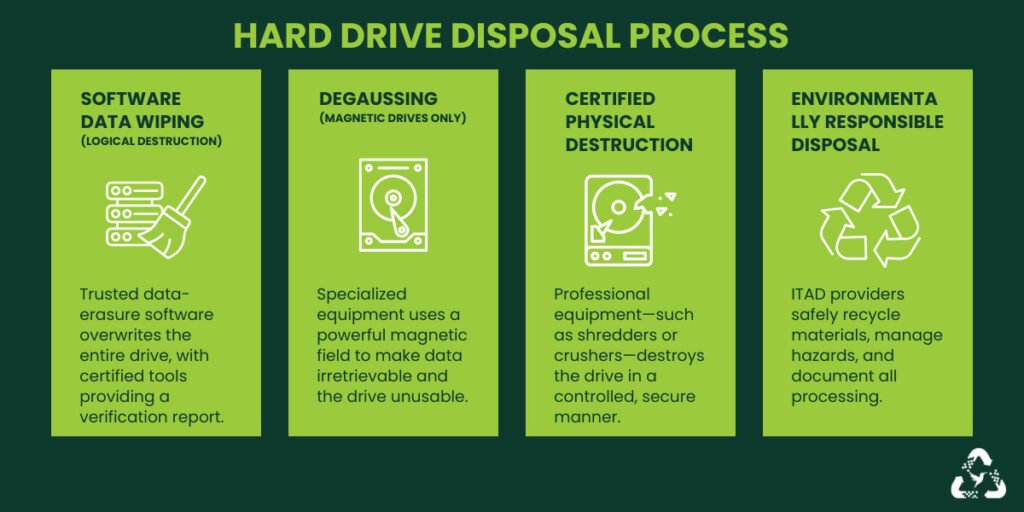
Step 4: Select an Appropriate Sanitization Method
Options include:
- Secure overwrite procedures
- Cryptographic erasure
- Physical destruction
The appropriate method depends on device type and data sensitivity.
Step 5: Verify Sanitization
Confirm data removal was successful.
Verification is a critical step that many organizations skip.
Step 6: Document the Process
Maintain records showing:
- Disposal date
- Sanitization method
- Responsible personnel
Documentation supports compliance efforts.
Step 7: Destroy High-Risk Devices
For highly sensitive information, physical destruction may be appropriate after sanitization.
Step-by-Step Guide: Securing SSD and HDD Disposal
Different storage technologies require different approaches.
For Traditional HDDs
Step 1: Perform Secure Overwriting
Overwrite the entire drive using approved sanitization tools.
Step 2: Verify Erasure
Confirm no recoverable data remains.
Step 3: Consider Physical Destruction
Particularly for highly sensitive information.
For SSDs
Step 1: Use Cryptographic Erasure
Many SSDs support secure erase functions.
Step 2: Reset Encryption Keys
Destroying encryption keys can render stored data unreadable.
Step 3: Verify Results
Ensure sanitization completed successfully.
Step 4: Destroy if Necessary
High-risk environments may require physical destruction.
Defense Layers for End-of-Life Data Protection
Secure disposal should be part of a broader cybersecurity strategy.
Full-Disk Encryption
Encrypting drives during their operational life reduces exposure if devices are lost or stolen.
Asset Management
Track devices from acquisition to disposal.
Vendor Due Diligence
Only use trusted disposal providers.
Request proof of destruction when applicable.
Access Controls
Restrict who can handle retired equipment.
Employee Training
Employees should understand proper disposal procedures.
Look, I get it, cybersecurity sounds like a headache, but many data breaches happen because old equipment is treated as harmless when it still contains valuable information.
Recovery Plan After Improper Disposal
Despite best efforts, mistakes can occur.
Immediate Actions
If a device is lost or improperly disposed of:
- Determine what data was stored.
- Assess exposure risks.
- Review access logs.
- Notify appropriate stakeholders.
Conduct a Security Investigation
Determine:
- Whether data was recoverable
- Who may have accessed it
- What information was exposed
Strengthen Disposal Procedures
Update policies to prevent future incidents.
Security Checklist for Safe Hard Drive Disposal
| Security Control | Required |
|---|---|
| Asset Inventory Maintained | Yes |
| Data Sensitivity Assessed | Yes |
| Backup Verification Completed | Yes |
| Secure Erasure Performed | Yes |
| Disposal Documented | Yes |
| Vendor Verification Conducted | Yes |
| Access Controls Applied | Yes |
| Encryption Used During Device Life | Recommended |
| Employee Training Completed | Recommended |
| Disposal Policy Reviewed Annually | Recommended |
Common Disposal Mistakes Businesses Make
Deleting Files Instead of Sanitizing Drives
Deleted data can often be recovered.
Forgetting Backup Devices
Backup media frequently contains the most sensitive information.
Ignoring SSD-Specific Requirements
SSDs require different sanitization techniques than HDDs.
Failing to Verify Erasure
Assuming data is gone without testing can be risky.
Using Unverified Disposal Vendors
Not all providers follow secure practices.
Lack of Documentation
Missing records create compliance and auditing challenges.
A poorly configured firewal may expose active systems, but improperly disposed storage devices can expose years of historical business information.
How Secure Disposal Supports Ransomware Defense
Modern ransomware groups often seek historical data.
Improperly disposed devices can reveal:
- Network architecture
- Credentials
- Customer information
- Backup locations
These details may help attackers plan future intrusions.
Secure disposal reduces the amount of intelligence available to cybercriminals.
The Role of Secure Disposal in Regulatory Compliance
Many industries require protection of sensitive information even after systems are retired.
Proper disposal practices help support:
- Privacy requirements
- Data protection obligations
- Industry security standards
- Client confidentiality commitments
Failure to dispose of devices securely can lead to legal and financial consequences.
Final Thoughts
Understanding the best practices for disposing of old business hard drives safely is an essential part of modern cybersecurity. In 2026, businesses face threats not only from active cyberattacks but also from information left behind on retired equipment. A discarded drive containing customer records, employee information, financial documents, or login credentials can become a valuable asset for cybercriminals.
By implementing secure data sanitization procedures, maintaining accurate asset inventories, using encryption, verifying erasure results, documenting disposal activities, and training employees, organizations can significantly reduce the risk of data exposure.
Here is the real talk about why your current password isn’t enough: even the strongest password cannot protect information stored on a discarded hard drive if proper disposal procedures are ignored. Your security strategy must protect data from creation to destruction.
At locknet.site, we help entrepreneurs and small businesses create resilient security programs that address every stage of the data lifecycle. Safe hard drive disposal is not just an IT task—it is a critical business protection strategy.
Ready to strengthen your data protection program? Conduct a hardware disposal audit, subscribe to the latest cybersecurity insights from locknet.site, and consult a security specialist today to ensure retired storage devices never become tomorrow’s security breach.
Leave a Reply