
Protect Your Business Before an Alert Becomes a Breach: Troubleshooting “Unexpected Login Attempt” Notifications in 2026
Learn how to investigate unexpected login attempt alerts and strengthen your business against phishing, ransomware, and account takeovers.
In today’s cybersecurity landscape, few notifications create more anxiety for business owners than seeing an alert that says, “Unexpected Login Attempt Detected.”
For many entrepreneurs and small business teams, the immediate reaction is confusion. Was it a hacker? An employee? A cloud synchronization issue? Or simply a false alarm?
In 2026, these notifications have become increasingly common as cloud platforms, email providers, financial institutions, and SaaS applications deploy advanced threat detection systems to combat rising cybercrime. At the same time, attackers are leveraging artificial intelligence, automated credential theft tools, phishing campaigns, and ransomware operations to target businesses of every size.
Understanding how to approach troubleshooting “Unexpected Login Attempt” notifications is now a critical cybersecurity skill.
Ignoring these alerts can expose your business to account takeovers, financial loss, data breaches, and ransomware attacks. Overreacting without proper investigation can also disrupt operations and create unnecessary downtime.
At locknet.site, we help entrepreneurs build a bulletproof digital presence by understanding both the technology and the tactics used by cybercriminals. This guide explains what these notifications mean, how to investigate them safely, and how to strengthen your defenses moving forward.
What Does an “Unexpected Login Attempt” Notification Mean?
Most online platforms continuously monitor account activity.
When behavior differs from established patterns, security systems may generate alerts.
These alerts typically indicate:
- Login attempts from unfamiliar locations
- Access from new devices
- Unusual login times
- Suspicious IP addresses
- Automated authentication attempts
- Credential stuffing attacks
- Failed multi-factor authentication requests
Importantly, not every notification means an account has been compromised.
Sometimes legitimate activity triggers security systems.
However, every alert deserves careful review.
Why These Notifications Are Increasing in 2026
Cybersecurity systems have become more sophisticated.
At the same time, cybercriminals have become more aggressive.
AI-powered tools now allow attackers to:
- Launch automated password attacks
- Test stolen credentials at scale
- Generate realistic phishing campaigns
- Mimic legitimate user behavior
- Target cloud applications more effectively
As a result, major platforms such as Microsoft 365, Google Workspace, banking portals, CRM platforms, and project management systems generate more security alerts than ever before.
For business owners, distinguishing real threats from harmless anomalies is essential.
Common Causes of Unexpected Login Attempt Alerts
Understanding the cause is the first step in troubleshooting.
Login from a New Device
If you recently signed in using:
- A new laptop
- Mobile phone
- Tablet
- Browser
the platform may flag the activity.
This is often harmless.
VPN Usage
VPN services can make logins appear to originate from unfamiliar locations.
This frequently triggers alerts.
Travel or Remote Work
Remote employees working from different cities or countries may generate security notifications.
Many platforms interpret geographic changes as suspicious.
Credential Stuffing Attacks
Attackers often test usernames and passwords stolen from previous breaches.
Even if they fail, the platform may generate a warning.
Phishing-Related Login Attempts
If credentials were entered into a fake website, attackers may attempt access from a different location.
Unexpected login alerts are sometimes the first warning sign.
Automated Application Activity
Connected applications occasionally generate authentication behavior that appears unusual.
Examples include:
- Email clients
- CRM integrations
- Backup services
- Automation tools
Vulnerability Assessment: What These Alerts May Reveal
Unexpected login attempt notifications should be treated as intelligence.
They often expose weaknesses before attackers achieve their objectives.
Weak Password Security
Passwords reused across multiple accounts remain a major risk.
If one service suffers a breach, attackers often test those credentials elsewhere.
Inadequate Authentication Controls
Accounts lacking strong multi-factor authentication are more vulnerable.
Cloud Configuration Issues
Improperly configured cloud applications may generate unnecessary access risks.
Employee Security Awareness Gaps
Users who cannot recognize phishing attempts may unintentionally expose credentials.
Shared Accounts
Shared credentials make it difficult to determine who actually initiated access.
Comparison Table: Benign vs Malicious Login Alerts
| Alert Scenario | Likely Risk Level | Investigation Required | Recommended Action |
|---|---|---|---|
| New Device Login | Low | Yes | Verify ownership |
| VPN Connection | Low | Yes | Confirm location |
| Employee Travel | Medium | Yes | Validate activity |
| Failed Password Attempts | Medium | Yes | Review account security |
| Credential Stuffing Detection | High | Immediate | Reset credentials |
| Login from Unknown Country | High | Immediate | Secure account immediately |
This comparison helps businesses prioritize response efforts.
Step-by-Step Guide: Investigating an Unexpected Login Attempt
When an alert appears, follow a structured response process.
Step 1: Do Not Ignore the Alert
Many successful breaches begin with warning signs that users dismiss.
Treat every notification seriously.
Step 2: Verify Whether the Activity Was Legitimate
Ask:
- Did you recently log in?
- Did an employee access the account?
- Was a VPN active?
- Was a new device used?
Document findings.
Step 3: Review Login History
Most major platforms provide login records.
Review:
- IP addresses
- Device information
- Geographic locations
- Timestamps
Look for unfamiliar activity.
Step 4: Change Passwords Immediately if Unsure
If ownership cannot be confirmed:
- Reset the password.
- Create a unique credential.
- Update password manager records.
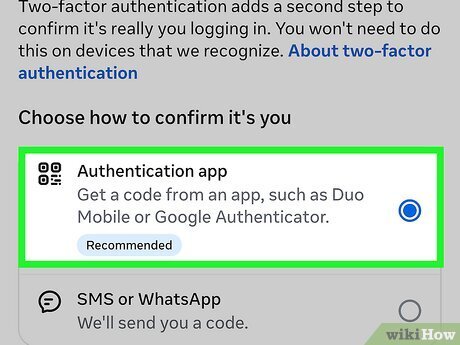
Step 5: Verify Multi-Factor Authentication
Confirm MFA remains enabled.
Review:
- Authenticator apps
- Recovery methods
- Security keys
Unexpected changes may indicate compromise.
Step 6: Sign Out of Active Sessions
Terminate all existing sessions if suspicious activity is detected.
This prevents attackers from maintaining access.
Step 7: Scan Endpoints for Malware
Unexpected login attempts can sometimes originate from compromised devices.
Run endpoint security scans on:
- Laptops
- Mobile devices
- Workstations
Step 8: Document Findings
Record:
- Alert details
- Investigation results
- Security actions taken
This helps improve future incident response.
Step-by-Step Guide: Securing Microsoft 365 Against Unauthorized Login Attempts
Microsoft 365 is one of the most frequently targeted business platforms.
Follow this proccess to strengthen protection.
Step 1: Enable Multi-Factor Authentication
Require MFA for all users.
Preferred options include:
- Microsoft Authenticator
- Hardware security keys
- Passkeys
Step 2: Configure Conditional Access Policies
Restrict access based on:
- Device compliance
- User risk
- Geographic location
- Authentication strength
Step 3: Enable Risk-Based Sign-In Monitoring
Use Microsoft’s security features to identify suspicious behavior automatically.
Step 4: Audit Sign-In Logs
Review logs weekly.
Focus on:
- Failed attempts
- Unrecognized devices
- Unusual countries
Step 5: Limit Administrative Access
Administrator accounts should have additional protection.
Separate admin accounts from everyday work accounts.
Step 6: Enable Passwordless Authentication
Passwordless authentication significantly reduces phishing risk.
Step 7: Monitor Security Alerts
Investigate every alert promptly.
Early response often prevents larger incidents.
Defense Layers Against Modern Login Threats
Unexpected login notifications are only one piece of the security puzzle.
Businesses should implement multiple defense layers.
Strong Password Management
Here is the real talk about why your current password isn’t enough.
Even a strong password becomes vulnerable if it is reused, exposed in a breach, or stolen through phishing.
Use a password manager to generate unique credentials.
Multi-Factor Authentication
MFA remains one of the most effective protections against account compromise.
Conditional Access Controls
Limit access according to:
- Device trust
- User identity
- Risk level
Security Awareness Training
Employees should recognize:
- Phishing emails
- Fake login pages
- Social engineering attempts
Endpoint Protection
Compromised devices often serve as entry points for attackers.
Install endpoint security software on every business device.
Recovery Plan for Small Businesses
Preparation is essential.
If suspicious login activity is confirmed:
Immediate Actions
- Change passwords
- Enable MFA
- Revoke active sessions
- Notify administrators
Investigate Scope
Determine:
- Which accounts were affected
- What data was accessed
- Whether lateral movement occurred
Strengthen Security Controls
Review:
- Authentication settings
- User permissions
- Cloud configurations
Conduct Employee Awareness Reviews
Teach staff how to identify warning signs.
Look, I get it, cybersecurity sounds like a headache, but prevention is far easier than recovering from a breach.
Security Checklist for Unexpected Login Attempt Notifications
| Security Control | Status |
|---|---|
| MFA Enabled on All Accounts | Required |
| Password Manager Deployed | Required |
| Login History Reviewed Regularly | Required |
| Endpoint Security Installed | Required |
| Conditional Access Enabled | Recommended |
| Passwordless Authentication Evaluated | Recommended |
| Security Alerts Monitored Daily | Recommended |
| Employee Awareness Training Completed | Required |
| Administrative Accounts Hardened | Required |
| Incident Response Plan Documented | Required |
Common Mistakes Businesses Make
Ignoring Alerts
Many attacks succeed because warning signs are dismissed.
Assuming Every Alert Is a Hacker
False positives do occur.
Investigation is necessary before conclusions are made.
Reusing Passwords
Credential reuse remains a leading cause of account compromise.
Delaying Security Updates
Outdated software increases exposure.
Weak Recovery Procedures
Account recovery methods should be secured with the same care as login credentials.
Lack of Monitoring
Without visibility, suspicious behavior may go unnoticed for weeks.
A small misconfigured firewal rule or neglected cloud setting can also create authentication anomalies that generate repeated alerts.
Final Thoughts
Troubleshooting “Unexpected Login Attempt” notifications is one of the most important cybersecurity practices for modern businesses. In a world of AI-driven phishing attacks, credential theft campaigns, cloud security risks, and ransomware threats, these alerts often provide the earliest indication that something is wrong.
While not every notification signals a breach, every alert deserves careful investigation. Organizations that respond quickly, verify activity, strengthen authentication controls, and monitor account access consistently are far better positioned to prevent account takeovers and data loss.
At locknet.site, we help entrepreneurs and small businesses build resilient security strategies that protect both productivity and sensitive information. By combining strong authentication, employee awareness, endpoint protection, and cloud security best practices, your business can stay ahead of emerging cyber threats.
Ready to strengthen your defenses? Conduct a login security audit, subscribe to the latest cybersecurity insights from locknet.site, and consult a security specialist today before an unexpected login attempt becomes an unexpected business crisis.
Leave a Reply