Protect Your Business Portal Before Hackers Strike: How to Prevent SQL Injection on Your Custom Business Portal
Learn how to prevent SQL injection on your custom business portal and defend your data against modern cyber threats in 2026.
In 2026, cybercriminals are more sophisticated, automated, and relentless than ever before. While businesses invest heavily in cloud security, ransomware protection, and employee awareness training, one of the oldest web application vulnerabilities continues to cause devastating security breaches: SQL injection.
Many business owners assume SQL injection attacks are outdated. Unfortunately, attackers know that thousands of custom-built portals, customer dashboards, employee systems, and internal web applications still contain exploitable database vulnerabilities.
A single successful SQL injection attack can expose customer records, financial information, employee data, business intelligence, and even administrator credentials.
If your company operates a custom business portal, understanding how to prevent SQL injection on your custom business portal is not optional—it is a fundamental cybersecurity requirement.
At locknet.site, we help entrepreneurs and small businesses build a bulletproof digital presence that can withstand modern threats. This guide explains SQL injection risks, prevention strategies, and security best practices designed for today’s AI-driven threat landscape.
What Is SQL Injection?
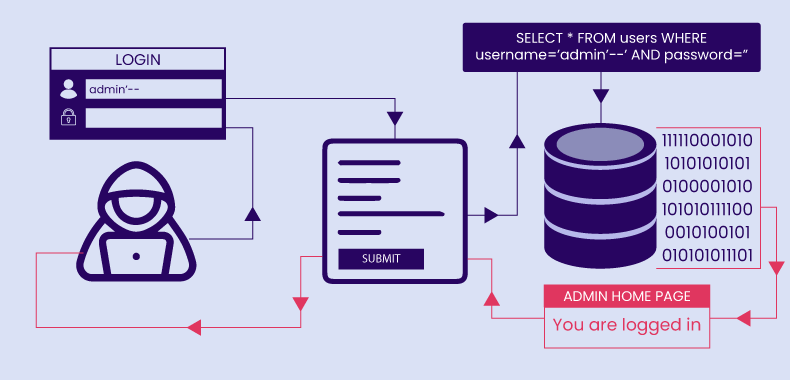
SQL injection, commonly called SQLi, is a web application attack that occurs when malicious SQL commands are inserted into application inputs and executed by a backend database.
Attackers exploit weaknesses in how applications process user input.
Instead of receiving legitimate information, the database receives unexpected commands.
These attacks may allow criminals to:
- Access sensitive data
- Modify database records
- Delete information
- Escalate privileges
- Bypass authentication
- Take control of applications
For businesses, the consequences can be severe.

Why SQL Injection Remains Dangerous in 2026
Despite decades of awareness, SQL injection continues to appear in vulnerability reports.
Modern attackers now combine traditional SQL injection techniques with:
- AI-assisted vulnerability discovery
- Automated scanning tools
- Credential theft campaigns
- Cloud infrastructure targeting
- Ransomware operations
Cybercriminals can identify vulnerable applications at scale and launch attacks within minutes.
Small businesses are often targeted because custom portals may lack enterprise-grade security reviews.
How SQL Injection Attacks Work
SQL injection occurs when applications improperly handle user input.
Common entry points include:
- Login forms
- Search boxes
- Contact forms
- Customer portals
- Employee dashboards
- API requests
If input validation is weak, attackers may manipulate database queries.
The result can include:
- Unauthorized access
- Data extraction
- Database corruption
- System compromise
The danger is amplified when databases contain customer records, payment information, or operational data.
Common Types of SQL Injection
Authentication Bypass
Attackers manipulate login forms to gain unauthorized access.
Error-Based SQL Injection
Attackers trigger database errors that reveal useful information.
Union-Based SQL Injection
Malicious queries combine results from multiple database tables.
Blind SQL Injection
Attackers infer database behavior without seeing direct results.
Time-Based SQL Injection
Attackers use timing responses to extract information slowly and stealthily.
Each technique can lead to serious security incidents if applications are not properly protected.
Vulnerability Assessment: Is Your Business Portal at Risk?
Many custom applications unknowingly contain SQL injection vulnerabilities.
Common warning signs include:
Dynamic SQL Queries
Applications that build queries using direct user input are particularly vulnerable.
Legacy Development Practices
Older applications may lack modern security controls.
Limited Security Testing
Applications that have never undergone penetration testing present elevated risk.
Weak Input Validation
Poor validation often creates attack opportunities.
Excessive Database Permissions
Applications running with high-level database privileges can amplify attack impact.
Business Impact of SQL Injection Attacks
The consequences extend far beyond technical issues.
Potential outcomes include:
Customer Data Exposure
Personal information may be stolen.
Financial Loss
Recovery costs can be substantial.
Regulatory Penalties
Data protection violations may result in fines.
Reputation Damage
Customer trust can be difficult to rebuild.
Ransomware Escalation
Compromised databases may become entry points for larger attacks.
Comparison Table: Vulnerable Database Practices vs Secure Database Practices
| Security Area | Vulnerable Approach | Secure Approach |
|---|---|---|
| Query Handling | Dynamic Queries | Parameterized Queries |
| Input Validation | Minimal Validation | Strict Validation |
| Database Access | Excessive Privileges | Least Privilege Access |
| Error Messages | Detailed Errors | Generic Errors |
| Monitoring | Limited Logging | Continuous Monitoring |
| Security Testing | Rare Testing | Regular Assessments |
This comparison demonstrates why layered security controls are essential.
Step-by-Step Guide: How to Prevent SQL Injection on Your Custom Business Portal
The most effective defense involves multiple security controls working together.
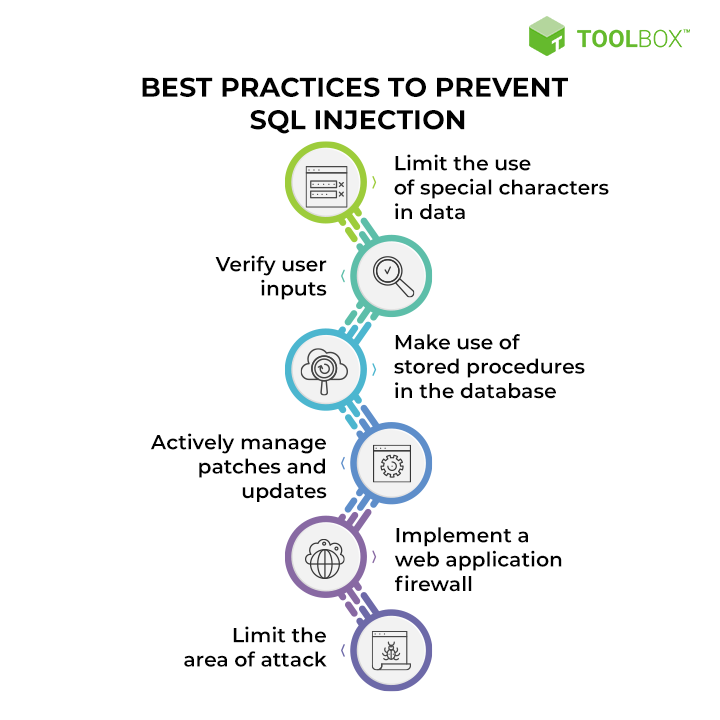
Step 1: Use Parameterized Queries
Parameterized queries separate data from executable code.
This prevents user input from being interpreted as SQL commands.
Modern frameworks typically support secure parameter handling.
Step 2: Implement Strong Input Validation
Validate all incoming data.
Verify:
- Length
- Format
- Data type
- Allowed characters
Reject unexpected input immediately.
Step 3: Use Stored Procedures Carefully
Stored procedures can improve security when implemented correctly.
However, poorly designed procedures may still introduce vulnerabilities.
Step 4: Apply Least Privilege Access
Database accounts should only have permissions required for their specific tasks.
For example:
- Read-only users should not modify records.
- Application accounts should not have administrative privileges.
Step 5: Sanitize User Input
While parameterized queries remain the primary defense, input sanitization provides an additional layer of protection.
Step 6: Hide Database Errors
Detailed database errors can reveal valuable information to attackers.
Display generic messages instead.
Step 7: Enable Security Logging
Monitor:
- Failed queries
- Authentication attempts
- Unusual database activity
Early detection reduces damage.
Step 8: Conduct Security Testing
Perform:
- Vulnerability assessments
- Penetration testing
- Code reviews
Security testing should occur regularly.
Step-by-Step Guide: Securing a Custom Portal Database Environment
A secure database environment reduces exposure significantly.
Step 1: Separate Development and Production Systems
Never test directly on production databases.
Step 2: Enable Database Encryption
Protect sensitive information both at rest and in transit.
Step 3: Restrict Administrative Access
Limit administrator privileges to authorized personnel.
Step 4: Implement Multi-Factor Authentication
Require MFA for administrative accounts.
Step 5: Configure Database Monitoring
Track:
- Query activity
- Login attempts
- Privilege changes
Step 6: Backup Data Regularly
Maintain secure backups.
Verify restoration procedures frequently.
Step 7: Review Permissions Quarterly
Access rights often accumulate over time.
Periodic reviews reduce unnecessary exposure.
Defense Layers Against Modern SQL Injection Threats
Effective protection requires more than secure coding.
Web Application Firewalls
A properly configured firewal can identify and block suspicious requests before they reach your application.
Secure Software Development Lifecycle
Integrate security into every stage of development.
Endpoint Security
Developers and administrators should use protected devices.
Compromised endpoints can undermine secure applications.
Cloud Security Controls
Many business portals now operate in cloud environments.
Apply:
- Access controls
- Monitoring
- Identity management
- Security alerts
AI-Assisted Threat Detection
Modern security tools can identify abnormal behavior and attack patterns more quickly than traditional monitoring systems.
Recovery Plan After a SQL Injection Incident
Preparation is essential.
Immediate Response Actions
If an attack is suspected:
- Isolate affected systems.
- Preserve evidence.
- Investigate activity.
- Block malicious access.
Assess Data Exposure
Determine:
- What information was accessed
- Which systems were affected
- Whether customer data was compromised
Remove Vulnerabilities
Fix the underlying weakness before restoring services.
Notify Stakeholders
Depending on regulations and impact, notification obligations may apply.
Strengthen Controls
Use the incident as an opportunity to improve security.
Security Checklist for SQL Injection Prevention
| Security Control | Required |
|---|---|
| Parameterized Queries Implemented | Yes |
| Input Validation Enabled | Yes |
| Least Privilege Database Access Applied | Yes |
| Error Messages Restricted | Yes |
| Database Monitoring Active | Yes |
| Web Application Firewall Enabled | Yes |
| Multi-Factor Authentication Used | Yes |
| Security Testing Conducted Regularly | Yes |
| Database Backups Maintained | Yes |
| Incident Response Plan Documented | Recommended |
Common Mistakes Businesses Make
Trusting User Input
User input should never be trusted automatically.
Overprivileged Database Accounts
Excessive permissions magnify attack consequences.
Delaying Security Reviews
Security testing should be ongoing, not occasional.
Ignoring Application Logs
Logs often reveal attack attempts early.
Relying Solely on Firewalls
A firewal is important, but it cannot replace secure coding.
Weak Administrative Credentials
Here is the real talk about why your current password isn’t enough.
Even the most secure application can be compromised if attackers gain access through stolen administrator credentials.
Use unique passwords, MFA, and password managers.
Look, I get it, cybersecurity sounds like a headache, but preventing SQL injection is far easier than responding to a major database breach.
How SQL Injection Relates to Ransomware and AI-Driven Threats
Modern attacks rarely occur in isolation.
SQL injection vulnerabilities can provide attackers with:
- Sensitive data
- Administrative access
- Internal network visibility
These footholds may later support ransomware deployment, extortion attempts, or advanced persistent threats.
AI-powered attack tools now accelerate vulnerability discovery, making proactive security more important than ever.
Final Thoughts
Understanding how to prevent SQL injection on your custom business portal is one of the most important cybersecurity responsibilities for organizations operating web-based applications in 2026. Although SQL injection is a well-known vulnerability, it continues to cause serious breaches because secure development practices are often overlooked.
By implementing parameterized queries, validating input, restricting database permissions, monitoring activity, securing cloud environments, and conducting regular security testing, businesses can dramatically reduce risk and protect valuable data.
At locknet.site, we help entrepreneurs and growing companies build resilient digital infrastructures capable of resisting modern cyber threats. A proactive security strategy today can prevent data breaches, ransomware incidents, regulatory penalties, and costly downtime tomorrow.
Ready to strengthen your business portal security? Conduct a database security audit, subscribe to the latest cybersecurity insights from locknet.site, and consult a security specialist today before a hidden SQL injection vulnerability becomes your next major cybersecurity crisis.
Leave a Reply