
Build a Zero Trust Security Policy Before the Next Cyberattack Targets Your Small Team
Learn how to create a Zero Trust security policy for a 5-person team and defend against phishing, ransomware, and cloud threats in 2026.
Cybersecurity has changed dramatically over the last few years. The traditional belief that everything inside a company network can be trusted is no longer valid. In 2026, cybercriminals are using AI-powered phishing attacks, automated credential theft, ransomware-as-a-service platforms, and cloud-focused exploits to target organizations of every size.
Many small business owners assume hackers only focus on large corporations. Unfortunately, the opposite is often true. Small teams are attractive targets because they typically have fewer security controls, limited IT resources, and less formal cybersecurity policies.
That is where Zero Trust security comes in.
If you are wondering how to create a Zero Trust security policy for a 5-person team, the good news is that you do not need an enterprise-sized budget or a dedicated cybersecurity department. With the right strategy, even a very small company can implement powerful protections that significantly reduce cyber risk.
At locknet.site, we help entrepreneurs and growing businesses build a bulletproof digital presence without unnecessary complexity. This guide will walk you through creating a practical, effective Zero Trust security policy designed specifically for small teams operating in today’s threat landscape.
What Is Zero Trust Security?
Zero Trust is a cybersecurity model based on one simple principle:
Never trust, always verify.
Instead of assuming users, devices, or applications are safe simply because they are inside your network, every access request must be verified continuously.
A Zero Trust approach assumes that:
- Accounts can be compromised
- Devices can become infected
- Insider threats can occur
- Phishing attacks can succeed
- Networks can be breached
Rather than granting blanket access, Zero Trust limits access to only what is necessary.
For a 5-person business, this dramatically reduces the potential damage from a security incident.
Why Small Teams Need Zero Trust in 2026
The modern workplace is more distributed than ever.
Most small businesses rely on:
- Cloud storage
- SaaS applications
- Remote employees
- Mobile devices
- Third-party contractors
Every connected system creates a potential attack surface.
Today’s cybercriminals use artificial intelligence to:
- Generate realistic phishing emails
- Clone communication styles
- Automate credential attacks
- Discover exposed business assets
Look, I get it, cybersecurity sounds like a headache, but implementing Zero Trust is often simpler than cleaning up after a ransomware attack.
The goal is not to make work difficult. The goal is to ensure every request is verified before access is granted.
Core Principles of a Zero Trust Security Policy
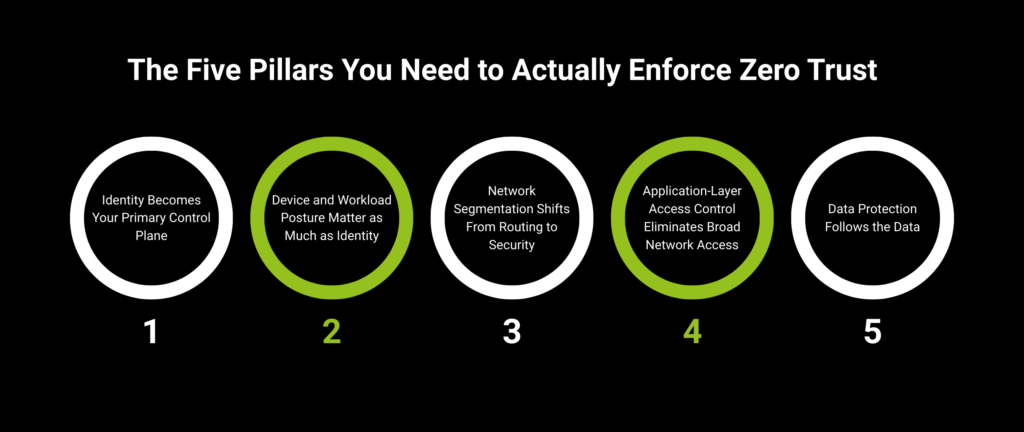
A successful Zero Trust policy for a small team should focus on five foundational principles.
Verify Every User
Every user must authenticate their identity before accessing business resources.
This includes:
- Employees
- Contractors
- Vendors
- Administrators
Enforce Least Privilege Access
Employees should only have access to systems required for their jobs.
For example:
- Marketing staff should not access payroll systems.
- Finance personnel should not manage website servers.
- Contractors should receive temporary permissions only.
Verify Device Security
Only approved devices should access company resources.
This helps prevent compromised personal devices from becoming attack vectors.
Monitor Activity Continuously
Authentication should not be the only security checkpoint.
User behavior should be monitored for:
- Suspicious logins
- Unusual locations
- Privilege escalation attempts
- Large file transfers
Assume Breach
A Zero Trust model assumes compromise is possible.
This mindset helps organizations prepare rather than react.
Vulnerability Assessment: Where Small Teams Usually Fail
Before building your policy, identify common weaknesses.
Shared Passwords
Many small businesses still share credentials via:
- Chat applications
- Spreadsheets
This creates serious security risks.
Excessive Permissions
Employees often accumulate access rights over time.
Unused privileges become hidden vulnerabilities.
Weak Authentication
SMS-only authentication remains common despite growing threats like SIM swapping.
Unmanaged Devices
Personal laptops and smartphones often access sensitive business systems without proper security controls.
Lack of Visibility
Many small businesses cannot accurately answer:
- Who has access?
- What devices are connected?
- Which accounts are inactive?
Without visibility, risk increases significantly.
Comparison Table: Traditional Security vs Zero Trust Security
| Security Area | Traditional Model | Zero Trust Model |
|---|---|---|
| User Trust | Trusted after login | Continuously verified |
| Device Access | Broad access | Restricted access |
| Authentication | One-time verification | Ongoing validation |
| Network Security | Perimeter-focused | Identity-focused |
| Cloud Security | Limited controls | Granular controls |
| Breach Impact | Potentially widespread | Contained and limited |
This shift is why Zero Trust has become one of the most important cybersecurity frameworks in modern business.
Step-by-Step Guide: Creating a Zero Trust Security Policy for a 5-Person Team
Step 1: Inventory All Business Assets
Create a complete list of:
- Devices
- User accounts
- SaaS applications
- Cloud services
- Administrative accounts
You cannot protect assets you do not know exist.
Step 2: Classify Sensitive Data
Identify where important information is stored.
Examples include:
- Customer records
- Financial documents
- Contracts
- Intellectual property
- Employee data
Classify assets by sensitivity level.
Step 3: Implement Multi-Factor Authentication Everywhere
Require MFA on all business systems.
Prioritize:
- Microsoft 365
- Google Workspace
- Banking platforms
- Payroll services
- Cloud storage
Avoid relying solely on SMS authentication.
Authenticator apps and security keys provide stronger protection.
Step 4: Deploy a Password Manager
Every team member should use a business password manager.
Benefits include:
- Unique passwords
- Secure sharing
- Credential monitoring
- Reduced phishing risk
Here is the real talk about why your current password isn’t enough.
Even a strong password becomes a liability if attackers steal it through phishing or reuse it across multiple platforms.
Step 5: Apply Least Privilege Access
Review every account.
Ask:
“Does this person truly need this access?”
Remove unnecessary permissions immediately.
Step 6: Secure Endpoints
Install endpoint protection software on all devices.
Security controls should include:
- Antivirus
- Device encryption
- Automatic updates
- Remote wipe capabilities
Step 7: Create Device Approval Policies
Only authorized devices should connect to business systems.
Require:
- Updated operating systems
- Security software
- Screen lock protection
Step 8: Monitor Authentication Activity
Enable logging and alerts.
Watch for:
- Failed logins
- Geographic anomalies
- New device registrations
- Privilege changes
Step 9: Establish Incident Response Procedures
Prepare for:
- Account compromise
- Malware infections
- Lost devices
- Unauthorized access
A documented response proccess reduces confusion during emergencies.
Step 10: Conduct Quarterly Reviews
Security is not a one-time project.
Review:
- User permissions
- Authentication methods
- Device inventory
- Security alerts
Regular reviews strengthen long-term resilience.
How to Secure Microsoft 365 Using Zero Trust Principles
Microsoft 365 is one of the most widely used business platforms and an excellent place to begin Zero Trust implementation.
Configure Conditional Access
Restrict access based on:
- Device health
- Location
- User role
- Risk level
Enable Passwordless Authentication
Implement:
- Passkeys
- Security keys
- Authenticator approvals
These methods reduce phishing exposure.
Restrict Administrative Privileges
Administrator accounts should be separate from daily-use accounts.
Monitor Sign-In Logs
Review login activity regularly for suspicious behavior.
Enable Data Loss Prevention
Protect sensitive information from accidental or malicious sharing.
Defense Layers Against Modern Cyber Threats
A Zero Trust policy should support multiple layers of defense.
AI-Driven Phishing Protection
Provide ongoing employee awareness training.
Teach staff how to identify:
- Fake login pages
- AI-generated emails
- Business impersonation scams
Ransomware Defense
Limit access between systems.
This prevents attackers from moving freely across the environment.
Secure Cloud Management
Apply Zero Trust controls to:
- Google Workspace
- Microsoft 365
- Dropbox
- Slack
- Salesforce
Cloud environments should receive the same protections as on-premise systems.
Secure Remote Work
Remote employees should follow:
- MFA requirements
- Device verification policies
- Secure Wi-Fi practices
Remote work security is now a core business requirement.
Zero Trust Security Checklist
| Security Control | Required |
|---|---|
| Multi-Factor Authentication Enabled | Yes |
| Password Manager Deployed | Yes |
| Least Privilege Access Applied | Yes |
| Device Inventory Completed | Yes |
| Endpoint Protection Installed | Yes |
| Authentication Logs Monitored | Yes |
| Conditional Access Policies Enabled | Recommended |
| Passwordless Authentication Deployed | Recommended |
| Incident Response Plan Documented | Yes |
| Quarterly Security Reviews Scheduled | Yes |
Common Mistakes Small Businesses Make
Giving Everyone Admin Rights
This dramatically increases risk.
Trusting Internal Networks
Attackers often operate inside networks after initial compromise.
Ignoring Cloud Security
Cloud accounts require the same protection as local systems.
Delaying Security Updates
Outdated software creates avoidable vulnerabilities.
Lack of Employee Training
Technology alone cannot stop modern cybercrime.
Employees remain a critical security layer.
Overcomplicating Security
The goal is effective security, not complexity.
Even a small team can implement Zero Trust successfully with a clear and practical approach.
Final Thoughts
Learning how to create a Zero Trust security policy for a 5-person team is one of the most valuable investments a small business can make in 2026. As AI-powered phishing attacks, ransomware campaigns, cloud threats, and credential theft continue to evolve, organizations must move beyond outdated trust models.
Zero Trust helps small teams reduce risk by verifying every user, limiting access, securing devices, monitoring activity, and preparing for potential compromise. The result is stronger resilience, better cloud security, and improved protection against modern cyber threats.
At locknet.site, we believe every entrepreneur deserves access to enterprise-level cybersecurity guidance without enterprise-level complexity. By implementing the strategies outlined in this guide, your business can significantly strengthen its security posture while supporting productivity and growth.
Ready to build a stronger defense? Audit your access controls, review your authentication systems, subscribe to the latest cybersecurity insights from locknet.site, and consult a security specialist today to create a Zero Trust strategy that protects your business before attackers find an opportunity.
Leave a Reply