Protect Your Business Before the Next Breach: How to Set Up an Automated Data Breach Alert System
Learn how to set up an automated data breach alert system and detect cyber threats before they become costly security incidents.
In 2026, the average small business faces a cybersecurity landscape that is more dangerous and fast-moving than ever before. Cybercriminals are using artificial intelligence to automate phishing campaigns, ransomware groups are targeting smaller organizations with precision, and cloud-based attacks continue to grow in sophistication.
The harsh reality is that many businesses don’t discover a breach immediately.
In some cases, attackers remain inside networks for weeks or even months before being detected. During that time, they may steal customer information, access financial records, compromise employee accounts, deploy malware, or prepare ransomware attacks.
This is why proactive detection has become just as important as prevention.
Understanding how to set up an automated data breach alert system allows businesses to identify suspicious activity early, minimize damage, and respond quickly before a security incident escalates into a crisis.
At locknet.site, we help entrepreneurs and small business owners build a bulletproof digital presence through practical cybersecurity strategies. This guide explains how automated breach monitoring works, why it matters, and how to implement a cost-effective alerting system that protects your organization around the clock.
Why Automated Data Breach Alerts Matter in 2026
Traditional security approaches focused primarily on prevention.
Today, prevention alone is no longer enough.
Even organizations with:
- Firewalls
- Antivirus software
- Multi-factor authentication
- Employee training
can still experience security incidents.
The key difference between a minor incident and a major disaster often comes down to detection speed.
An automated data breach alert system helps identify:
- Unauthorized access attempts
- Credential exposure
- Suspicious account activity
- Malware infections
- Cloud security incidents
- Insider threats
- Unusual network behavior
The sooner you know something is wrong, the faster you can respond.
What Is an Automated Data Breach Alert System?
A data breach alert system continuously monitors digital assets and generates notifications when suspicious activity occurs.
Rather than relying on manual reviews, automated monitoring tools work 24/7.
These systems can monitor:
- User accounts
- Email addresses
- Cloud environments
- Websites
- Business domains
- Authentication events
- Security logs
- Network activity
Alerts are triggered when predefined risk indicators are detected.
Common Threats That Automated Monitoring Can Detect
Credential Exposure
Stolen usernames and passwords often appear in breach databases before businesses realize they have been compromised.
Account Takeovers
Attackers frequently attempt unauthorized access to cloud platforms and business applications.
AI-Driven Phishing Campaigns
Artificial intelligence enables highly convincing phishing attacks that target employees and executives.
Ransomware Activity
Early warning signs may appear before ransomware deployment.
Suspicious Login Behavior
Examples include:
- New locations
- Unusual devices
- Impossible travel events
Cloud Security Incidents
Unauthorized file sharing or privilege changes often generate detectable indicators.
Vulnerability Assessment: Does Your Business Need Automated Alerts?
The answer is almost always yes.
You face elevated risk if:
Employees Use Multiple Cloud Services
More accounts create more attack surfaces.
Remote Work Is Common
Distributed teams increase visibility challenges.
Sensitive Data Is Stored Digitally
Customer records and financial information are attractive targets.
Security Monitoring Is Manual
Manual monitoring often misses early warning signs.
No Formal Incident Detection Process Exists
Without automated alerts, attacks may remain undetected for extended periods.
Comparison Table: Manual Monitoring vs Automated Breach Detection
| Security Area | Manual Monitoring | Automated Alert System |
|---|---|---|
| Monitoring Hours | Limited | 24/7 |
| Detection Speed | Slow | Immediate |
| Human Error Risk | High | Lower |
| Scalability | Limited | High |
| Threat Visibility | Partial | Comprehensive |
| Incident Response | Reactive | Proactive |
This comparison highlights why automated detection has become a critical cybersecurity capability.
Core Components of an Automated Data Breach Alert System
An effective system includes multiple monitoring layers.
Credential Monitoring
Tracks whether employee credentials appear in known breach datasets.
Email Security Monitoring
Identifies suspicious email-related activity.
Endpoint Monitoring
Detects malware, ransomware indicators, and unauthorized software.
Cloud Security Monitoring
Monitors file access, account activity, and permission changes.
Log Analysis
Collects and analyzes security logs from multiple sources.
Alerting Mechanisms
Provides notifications through:
- SMS
- Mobile applications
- Collaboration platforms
Step-by-Step Guide: How to Set Up an Automated Data Breach Alert System
The following framework is designed for small businesses with limited budgets.
Step 1: Identify Critical Assets
Determine which assets require monitoring.
Examples include:
- Business email accounts
- Customer databases
- Cloud storage platforms
- Websites
- Employee accounts
Focus on protecting your highest-value resources first.
Step 2: Inventory User Accounts
Create a complete list of:
- Employee accounts
- Administrator accounts
- Shared accounts
- Service accounts
Visibility is essential for effective monitoring.
Step 3: Enable Security Notifications
Most cloud providers offer built-in alerts.
Configure notifications for:
- Failed login attempts
- New devices
- Password changes
- Privilege escalations
Step 4: Monitor Credential Exposure
Track whether employee email addresses appear in public breach records.
Early detection reduces account takeover risk.
Step 5: Centralize Security Logs
Collect logs from:
- Cloud platforms
- Endpoints
- Network devices
- Business applications
Centralized monitoring improves visibility.
Step 6: Define Alert Thresholds
Not every event requires an emergency response.
Prioritize alerts based on risk levels.
Examples include:
- Critical
- High
- Medium
- Low
Step 7: Assign Alert Ownership
Determine who receives and responds to alerts.
Clear ownership reduces confusion during incidents.
Step 8: Test Alert Workflows
Generate test alerts to verify functionality.
A system that has never been tested may fail during a real incident.
Step-by-Step Guide: Securing Cloud-Based Alerting Systems
Many businesses rely on cloud environments for operations.
Follow this proccess to improve monitoring security.
Step 1: Enable Multi-Factor Authentication
Protect monitoring accounts with MFA.
Step 2: Restrict Administrative Access
Only authorized personnel should manage alert configurations.
Step 3: Configure Audit Logging
Record:
- User activity
- Configuration changes
- Authentication events
Step 4: Enable Security Event Monitoring
Track:
- Login attempts
- Data access
- File sharing activities
Step 5: Review Alerts Regularly
Even automated systems require oversight.
Step 6: Protect Notification Channels
Ensure email and messaging systems used for alerts are secure.
Step 7: Backup Monitoring Configurations
Preserve settings in case of accidental changes or system failures.
Defense Layers That Strengthen Breach Detection
Automated alerts should be part of a broader cybersecurity strategy.
Multi-Factor Authentication
MFA helps prevent unauthorized access even if credentials are exposed.
Password Managers
Here is the real talk about why your current password isn’t enough.
Strong passwords remain important, but attackers increasingly steal credentials through phishing and malware rather than brute-force attacks.
Password managers improve credential security significantly.
Endpoint Detection and Response
EDR tools help identify suspicious device behavior.
Cloud Security Controls
Monitor:
- Sharing permissions
- Account activity
- User behavior
Security Awareness Training
Employees remain a critical defense layer.
Look, I get it, cybersecurity sounds like a headache, but many breaches begin with a single click on a malicious email.
Training helps employees recognize threats before damage occurs.
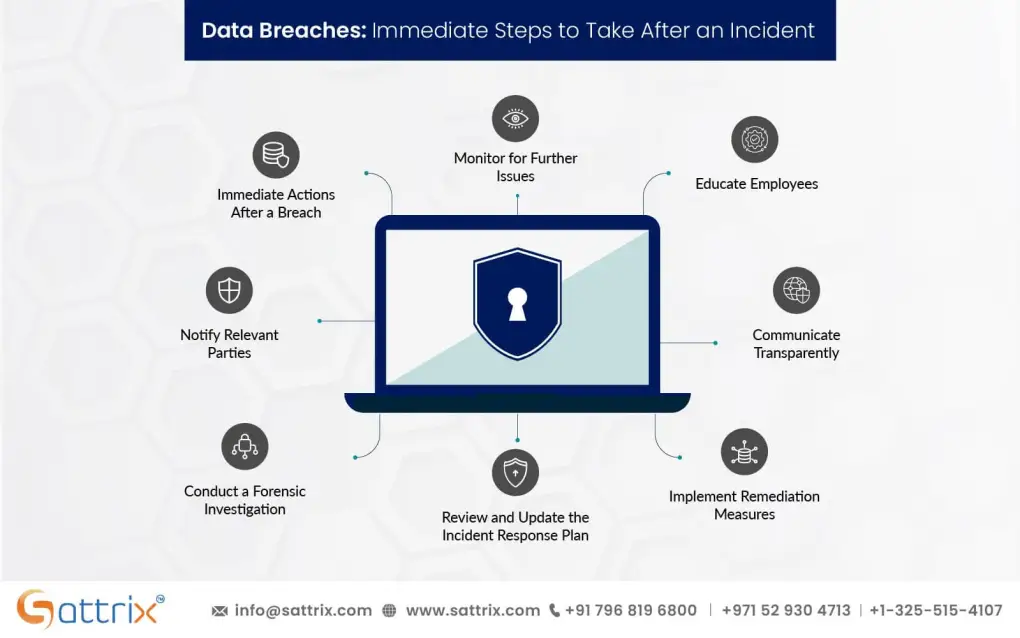
Recovery Plan After a Breach Alert
Receiving an alert is only the beginning.
Immediate Actions
When a high-risk alert occurs:
- Verify the event.
- Isolate affected systems.
- Reset compromised credentials.
- Investigate activity.
Determine Scope
Identify:
- Affected accounts
- Accessed data
- Potential impact
Strengthen Security Controls
Address any weaknesses discovered during the investigation.
Notify Stakeholders
Depending on regulations and business requirements, notification obligations may apply.
Security Checklist for Automated Breach Monitoring
| Security Control | Required |
|---|---|
| Critical Assets Identified | Yes |
| Security Notifications Enabled | Yes |
| Credential Monitoring Active | Yes |
| Security Logs Centralized | Yes |
| MFA Enabled | Yes |
| Alert Ownership Assigned | Yes |
| Cloud Monitoring Enabled | Yes |
| Alert Testing Conducted | Yes |
| Incident Response Plan Documented | Yes |
| Employee Security Training Completed | Recommended |
Common Mistakes Businesses Make
Ignoring Low-Level Alerts
Small warning signs often precede larger incidents.
Alert Fatigue
Too many notifications can overwhelm teams.
Failing to Test Alert Systems
Untested systems may not function correctly during emergencies.
Lack of Incident Response Planning
Detection without response planning limits effectiveness.
Unsecured Administrative Accounts
Monitoring systems themselves must be protected.
Relying on a Single Detection Method
Effective monitoring requires multiple data sources.
A poorly configured firewal can create security gaps, but failing to detect suspicious activity quickly can turn a minor issue into a major breach.
How Automated Alerts Support Ransomware Defense
Modern ransomware attacks rarely happen instantly.
Attackers often spend time:
- Gathering credentials
- Escalating privileges
- Exploring systems
- Disabling protections
Automated alerting can identify these activities early.
This provides valuable time to contain threats before ransomware deployment occurs.
Automated Monitoring and Remote Teams
Remote work introduces additional security challenges.
Employees access resources from:
- Home networks
- Mobile devices
- Shared workspaces
Automated monitoring improves visibility across distributed environments.
This is especially important for organizations managing remote teams and cloud-based workflows.
Final Thoughts
Learning how to set up an automated data breach alert system is one of the most valuable cybersecurity investments a small business can make in 2026. Cybercriminals are moving faster, AI-powered attacks are becoming more sophisticated, and organizations can no longer rely solely on preventive controls.
Automated breach monitoring provides continuous visibility into suspicious activity, helping businesses identify threats before they escalate into costly security incidents. By monitoring credentials, accounts, cloud environments, endpoints, and authentication events, organizations can dramatically improve detection speed and reduce overall risk.
At locknet.site, we help entrepreneurs and growing businesses build resilient security programs that combine prevention, detection, and response. A strong alerting system gives you the visibility needed to defend against modern cyber threats and maintain customer trust.
Ready to strengthen your security posture? Conduct a monitoring audit, subscribe to the latest cybersecurity insights from locknet.site, and consult a security specialist today to build an automated breach detection strategy that keeps your business protected around the clock.
Leave a Reply