Protect Your Business from SIM Swapping Attacks Before Cybercriminals Take Control of Your Accounts
Stop SIM swapping attacks in 2026 with proven security strategies that protect business accounts, cloud systems, and remote teams.
In the modern threat landscape, cybercriminals no longer need to break through firewalls or deploy sophisticated malware to gain access to business systems. Sometimes, all they need is control of a single phone number.
SIM swapping attacks have become one of the fastest-growing cyber threats targeting small businesses, entrepreneurs, executives, and remote workers. In 2026, these attacks are even more dangerous because cybercriminals are combining AI-driven phishing campaigns, social engineering tactics, and stolen personal information to bypass traditional security controls.
For small businesses, a successful SIM swap can lead to stolen funds, compromised cloud accounts, ransomware infections, customer data exposure, and severe reputational damage.
Understanding how to protect your business from SIM swapping attacks is no longer optional. It is a critical component of modern cybersecurity strategy.
At locknet.site, we help business owners build a bulletproof digital presence by identifying hidden risks before cybercriminals exploit them. This guide explains how SIM swapping works, why it remains effective, and the practical steps every business should take to stay protected.
What Is a SIM Swapping Attack?
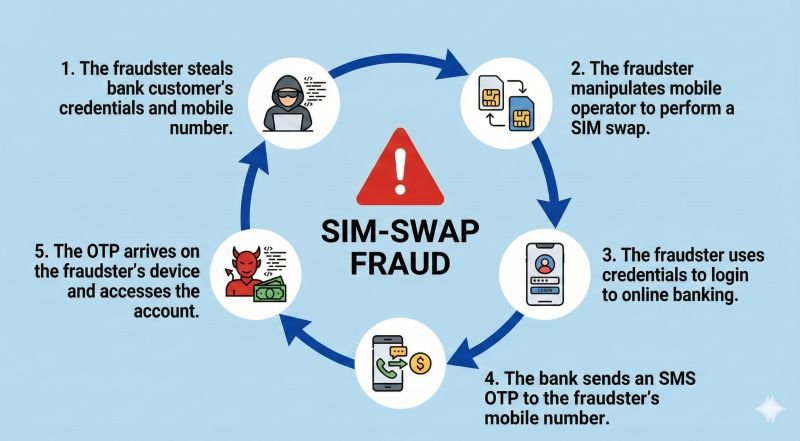
A SIM swapping attack occurs when a criminal convinces a mobile carrier to transfer your phone number to a SIM card under their control.
Once the transfer is completed, the attacker receives:
- Phone calls
- SMS messages
- Verification codes
- Password reset requests
- Multi-factor authentication (MFA) codes
From that point, they can begin taking over accounts linked to the victim’s phone number.
This attack often targets:
- Business email accounts
- Banking platforms
- Cryptocurrency wallets
- Cloud storage systems
- Customer management platforms
- Payroll services
- Remote access tools
The attack itself is surprisingly simple but extremely effective.
Why SIM Swapping Is More Dangerous in 2026
Cybercriminals have evolved their tactics dramatically.
Artificial intelligence now helps attackers:
- Generate realistic phishing emails
- Create convincing customer service conversations
- Analyze social media profiles
- Automate identity gathering
- Craft personalized scams
Instead of guessing information, attackers often know:
- Employee names
- Mobile numbers
- Company roles
- Business partners
- Service providers
This makes impersonation much more believable.
Small businesses are especially vulnerable because they often lack dedicated security teams and formal identity verification procedures.
How a Typical SIM Swap Attack Happens
Understanding the attack chain helps organizations build stronger defenses.
Phase 1: Information Gathering
The attacker collects data through:
- Social media research
- Data breaches
- Phishing campaigns
- Public business records
- Employee profiles
Phase 2: Identity Impersonation
The criminal contacts the mobile carrier and pretends to be the account owner.
Common excuses include:
- Lost phone
- Damaged device
- Device upgrade
- Travel emergency
Phase 3: SIM Transfer
If the carrier’s verification process is bypassed, the phone number gets transferred.
At this stage, the legitimate owner typically loses network service.
Phase 4: Account Takeover
The attacker begins resetting passwords and intercepting verification codes.
Within minutes, critical business systems may be compromised.
Warning Signs of a SIM Swapping Attack
Many victims notice warning signs only after damage has begun.
Watch for these indicators:
Sudden Loss of Mobile Service
One of the most common symptoms is unexpected signal loss.
If your phone suddenly displays:
- No service
- Emergency calls only
- Network unavailable
without a known outage, investigate immediately.
Unexpected Password Reset Notifications
Receiving password reset emails you did not request can indicate an ongoing attack.
MFA Requests You Didn’t Initiate
Unauthorized authentication requests should never be ignored.
Banking Alerts
Unexpected financial notifications may indicate account compromise.
Locked-Out Cloud Accounts
If credentials suddenly stop working, an attacker may have changed account settings.
Vulnerability Assessment: Is Your Business at Risk?
Many organizations unknowingly depend on SMS authentication for critical services.
This creates significant exposure.
High-Risk Business Assets
The following systems are frequently targeted:
- Microsoft 365 accounts
- Google Workspace
- Online banking portals
- Payment processors
- Cloud infrastructure dashboards
- Payroll systems
Remote Workforce Challenges
Remote teams often rely heavily on mobile authentication.
This increases the potential impact of SIM-related attacks.
Businesses with distributed employees should pay special attention to mobile identity protection.
Comparison Table: SMS-Based MFA vs More Secure Alternatives
| Authentication Method | SIM Swap Resistant | Phishing Resistant | Security Level |
|---|---|---|---|
| SMS Codes | No | No | Moderate |
| Email Codes | Partial | No | Moderate |
| Authenticator Apps | Yes | Partial | High |
| Hardware Security Keys | Yes | Yes | Very High |
| Passkeys | Yes | Yes | Very High |
The table clearly shows why many cybersecurity experts recommend moving away from SMS-based verification whenever possible.
Defense Layers Against SIM Swapping Attacks
Strong protection requires multiple security controls working together.
Replace SMS Authentication Where Possible
SMS verification remains one of the weakest MFA options.
Organizations should prioritize:
- Authenticator apps
- Security keys
- Passkeys
These methods are not vulnerable to SIM transfers.
Use Strong Password Management
Here is the real talk about why your current password isn’t enough.
Even the strongest password becomes useless if attackers can reset it using your phone number.
Every account should have:
- Unique credentials
- Long passwords
- Password manager protection
Secure Employee Information
Reduce publicly available data whenever possible.
Attackers often gather information from:
- Company websites
- Social media accounts
Limiting exposure makes impersonation more difficult.
Enable Carrier Security Features
Many mobile providers offer additional protections.
Examples include:
- Account PINs
- Port-out locks
- SIM transfer restrictions
- Identity verification requirements
Activate every available security feature.
Step-by-Step Guide: Securing Microsoft 365 Against SIM Swapping Risks
Microsoft 365 remains one of the most commonly targeted business platforms.
Follow this proccess to strengthen protection.
Step 1: Access Microsoft Entra Admin Center
Log in with administrative privileges.
Review all authentication methods currently enabled.
Step 2: Audit User Authentication Settings
Identify users relying solely on SMS verification.
Document affected accounts.
Step 3: Deploy Microsoft Authenticator
Require employees to:
- Install Microsoft Authenticator
- Register devices
- Verify enrollment
Authenticator apps are significantly safer than SMS.
Step 4: Enable Conditional Access Policies
Restrict authentication based on:
- Device trust
- User risk
- Geographic location
- Network reputation
Step 5: Implement Passwordless Authentication
Whenever possible, deploy:
- Passkeys
- Security keys
- Authenticator push approvals
This reduces dependency on phone numbers.
Step 6: Monitor Sign-In Logs
Review authentication activity regularly.
Look for:
- Unusual locations
- Failed logins
- Unexpected device registrations
Step 7: Establish Emergency Recovery Procedures
Prepare recovery methods before incidents occur.
Recovery plans should include:
- Backup authentication methods
- Administrative recovery accounts
- Identity verification procedures
Building a SIM Swap Recovery Plan
Even well-protected organizations should prepare for worst-case scenarios.
Immediate Response Checklist
If a SIM swap is suspected:
- Contact your carrier immediately.
- Request account suspension.
- Freeze ongoing transfers.
- Reset critical passwords.
- Notify IT administrators.
- Review account activity.
- Secure financial accounts.
Fast response can significantly reduce damage.
Incident Documentation
Record:
- Timeline of events
- Affected accounts
- Financial impact
- Security actions taken
This information helps improve future defenses.
Common Business Mistakes That Increase Risk
Relying Exclusively on SMS MFA
Many organizations still depend entirely on text-message verification.
This remains one of the largest weaknesses in modern identity security.
No Carrier Security PIN
Without an account PIN, attackers have fewer barriers to overcome.
Ignoring Employee Security Awareness
Look, I get it, cybersecurity sounds like a headache, but employees remain one of the strongest defenses against social engineering.
Training matters.
Weak Recovery Procedures
Poor recovery workflows can make an attack even more damaging.
Failing to Monitor Cloud Authentication Logs
Organizations often discover compromises days after they occur.
Regular monitoring can shorten detection times dramatically.
Security Checklist for Preventing SIM Swapping
| Security Control | Status |
|---|---|
| SMS MFA Replaced Where Possible | Required |
| Authenticator App Enabled | Required |
| Carrier Account PIN Configured | Required |
| Port-Out Lock Activated | Recommended |
| Password Manager Deployed | Required |
| Employee Security Training Completed | Required |
| Cloud Authentication Logs Reviewed | Recommended |
| Security Keys for Administrators | Recommended |
| Recovery Procedures Tested | Required |
| Quarterly Security Audit Conducted | Recommended |
Final Thoughts
Learning how to protect your business from SIM swapping attacks is essential in today’s cyber threat environment. Attackers increasingly target mobile identities because they know many organizations still rely on SMS authentication for access to critical systems.
The combination of AI-driven phishing, identity theft, and social engineering has made SIM swapping more effective than ever. A single compromised phone number can lead to stolen funds, breached cloud accounts, ransomware infections, and serious business disruption.
Fortunately, businesses can dramatically reduce risk by replacing SMS authentication with authenticator apps, passkeys, and hardware security keys while strengthening carrier-level protections and employee awareness programs.
At locknet.site, we help entrepreneurs and growing companies stay ahead of evolving cyber threats with practical, expert-led guidance designed for the realities of modern business.
Ready to strengthen your defenses? Conduct a mobile security audit, subscribe to the latest cybersecurity insights from locknet.site, and consult a security specialist today before a SIM swapping attack turns your business phone number into an attacker’s master key.
Leave a Reply