Protect Your Business Domain from Domain Hijacking Before Cybercriminals Take Control
Secure your business domain from hijacking, phishing, and ransomware with proven domain protection strategies for 2026.
Your domain name is more than just a website address. It is the digital identity of your business, the foundation of your brand, and often the gateway to customer trust. If a cybercriminal gains control of your domain, they can redirect visitors, intercept emails, launch phishing campaigns, steal sensitive information, and potentially shut down your online operations overnight.
In 2026, domain hijacking has become one of the most dangerous threats facing small and medium-sized businesses. Attackers are combining artificial intelligence, social engineering, credential theft, and cloud infrastructure attacks to compromise domains faster than ever before.
The good news is that domain hijacking is largely preventable when businesses understand the risks and implement the right security controls.
Look, I get it, cybersecurity sounds like a headache, but protecting your domain is one of the most important investments you can make for your company’s future.
This guide explains how to protect your business domain from domain hijacking, recognize warning signs, and build a resilient defense strategy against modern cyber threats.
What Is Domain Hijacking?
Domain hijacking occurs when an unauthorized individual gains control of a domain name without the owner’s permission.
Once attackers control the domain, they may:
- Redirect website visitors to malicious websites
- Steal customer information
- Intercept business emails
- Conduct phishing attacks
- Damage brand reputation
- Disrupt online operations
- Deploy ransomware campaigns
Unlike traditional website hacking, domain hijacking targets the ownership and management of the domain itself.
If attackers control the domain, they often control everything connected to it.

Why Domain Hijacking Is Increasing in 2026
The cyber threat landscape has evolved dramatically.
Several factors are fueling increased domain attacks:
AI-Powered Social Engineering
Attackers now use artificial intelligence to create convincing emails, support requests, and fake identity documents.
These AI-generated communications can trick registrars, hosting providers, and employees into granting unauthorized access.
Remote Workforce Expansion
Remote teams often access business systems from multiple locations and devices, increasing the attack surface.
Cloud Dependency
Businesses increasingly rely on cloud-based services that connect directly to domain infrastructure.
A compromised domain can impact:
- Email systems
- Customer portals
- SaaS platforms
- E-commerce stores
- Cloud applications
Credential Breaches
Billions of stolen credentials continue circulating on criminal marketplaces, making weak passwords a major vulnerability.
How Domain Hijacking Happens
Understanding attack methods helps businesses strengthen defenses.
Registrar Account Compromise
Attackers gain access to the domain registrar account through:
- Stolen passwords
- Credential stuffing attacks
- Phishing emails
- Malware infections
Once inside, attackers can transfer ownership or modify DNS settings.
DNS Manipulation
Criminals alter DNS records to redirect traffic to malicious servers.
Visitors may believe they are interacting with your legitimate website while unknowingly sharing data with attackers.
Email Account Takeover
Business email accounts linked to domain management become valuable targets.
Compromised email accounts can be used to:
- Reset registrar passwords
- Approve domain transfers
- Intercept security notifications
Insider Threats
Current or former employees with registrar access may intentionally or accidentally compromise domain security.
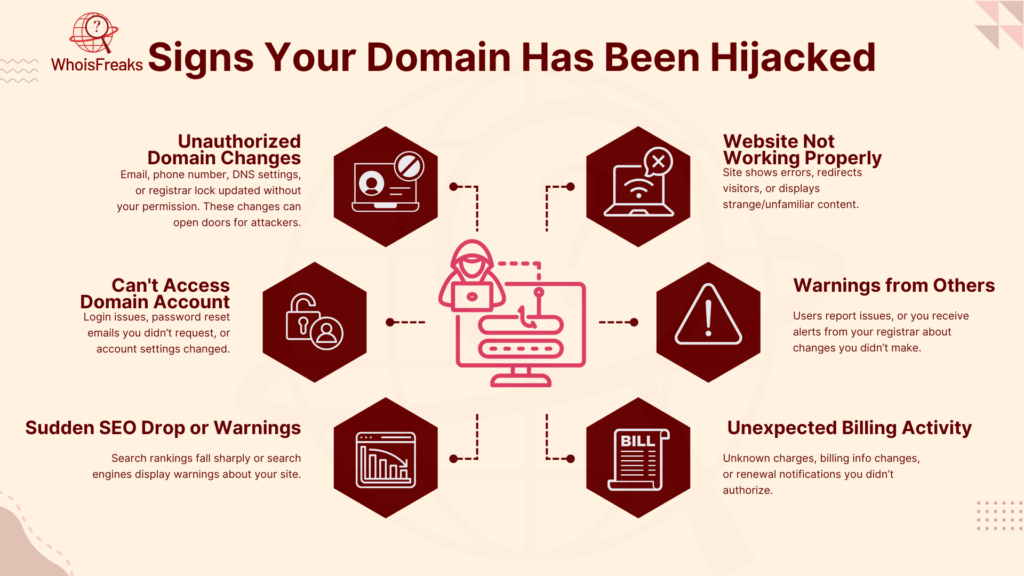
Warning Signs of Domain Hijacking
Early detection can significantly reduce damage.
Watch for:
- Website traffic suddenly dropping
- Customers reporting suspicious website behavior
- Unexpected DNS changes
- Missing email messages
- Unauthorized registrar notifications
- SSL certificate warnings
- Login alerts from unknown locations
Any unexplained change involving your domain should trigger immediate investigation.
Business Impact of Domain Hijacking
The consequences often extend far beyond temporary downtime.
Financial Losses
Revenue interruptions can occur within minutes of a successful attack.
Reputation Damage
Customers may lose confidence if redirected to fraudulent websites.
Data Breaches
Sensitive customer and employee information may become exposed.
Compliance Risks
Regulated industries face potential legal and regulatory consequences.
Operational Disruption
Business-critical systems frequently depend on domain availability.
Domain Security Checklist for 2026
| Security Control | Importance | Recommended Action |
|---|---|---|
| Multi-Factor Authentication | Critical | Enable for all registrar accounts |
| Domain Lock | Critical | Prevent unauthorized transfers |
| Strong Password Policy | High | Use unique passwords |
| DNS Monitoring | High | Monitor changes continuously |
| Registrar Security Alerts | High | Enable all notifications |
| Access Control Reviews | High | Limit administrative privileges |
| Email Security | Critical | Protect recovery accounts |
| Backup DNS Records | Medium | Maintain secure backups |
| Security Audits | High | Conduct quarterly reviews |
| Incident Response Plan | Critical | Prepare recovery procedures |
Businesses that implement these controls significantly reduce hijacking risks.
Step-by-Step Guide: How to Secure Your Domain Against Hijacking
Step 1: Enable Multi-Factor Authentication
Every registrar account should require MFA.
This creates an additional layer of security beyond passwords.
Authenticator apps are generally more secure than SMS verification.
Step 2: Activate Domain Lock
Most registrars offer domain lock features.
Domain locking prevents:
- Unauthorized transfers
- Ownership modifications
- Registrar changes
This simple setting blocks many hijacking attempts.
Step 3: Strengthen Password Security
Use:
- Long passwords
- Unique credentials
- Password managers
Here is the real talk about why your current password isn’t enough. Cybercriminals use automated tools capable of testing stolen credentials against thousands of services every minute.
Step 4: Protect Administrative Email Accounts
Your registrar account is only as secure as its associated email address.
Implement:
- MFA
- Spam filtering
- Email security monitoring
A compromised email account often becomes the attacker’s entry point.
Step 5: Restrict Administrative Access
Only authorized personnel should have domain management permissions.
Follow the principle of least privilege.
Remove access immediately when employees change roles or leave the company.
Step 6: Monitor DNS Changes
Use DNS monitoring tools to detect:
- Unauthorized modifications
- New records
- Configuration anomalies
Rapid detection significantly improves response times.
Step 7: Enable Registrar Notifications
Configure alerts for:
- Password changes
- DNS updates
- Transfer requests
- Contact modifications
Immediate notifications allow quick intervention.
Step 8: Maintain Accurate WHOIS Information
Outdated contact details can complicate recovery efforts.
Ensure all registrar information remains current.
Step 9: Secure Cloud Services
Cloud applications frequently depend on domain ownership verification.
Review:
- Connected cloud services
- Identity management systems
- Access permissions
Misconfigured cloud environments create unnecessary risk.
Step 10: Conduct Regular Security Audits
Review domain security controls quarterly.
The audit proccess should include:
- Access reviews
- DNS verification
- Password assessments
- Incident response testing
Defending Against AI-Driven Phishing Attacks
AI-generated phishing campaigns are among the most effective domain hijacking techniques in 2026.
Attackers create realistic messages impersonating:
- Domain registrars
- Hosting providers
- Technology vendors
- Internal executives
Protection strategies include:
Employee Awareness Training
Educate staff to identify suspicious communications.
Verification Procedures
Require independent verification before approving account changes.
Email Authentication
Implement:
- SPF
- DKIM
- DMARC
These controls reduce phishing success rates.
Domain Security and Ransomware Defense
Domain security directly supports ransomware prevention.
Attackers often target domains before deploying ransomware.
Strong domain controls help prevent:
- Malicious redirects
- Command-and-control communications
- Credential theft operations
Additional ransomware defenses include:
Offline Backups
Maintain isolated backup copies.
Endpoint Protection
Secure employee devices.
Network Segmentation
Limit lateral movement opportunities.
Access Controls
Restrict administrative privileges wherever possible.
Secure Cloud Management for Remote Teams
Modern businesses rely heavily on remote work and cloud infrastructure.
Protect cloud-connected domains by implementing:
Identity and Access Management
Use centralized identity controls.
Zero-Trust Security
Verify every access request regardless of location.
Continuous Monitoring
Monitor cloud resources for unusual activity.
Device Security Policies
Require secure endpoints for administrative access.
Even a strong domain security strategy can fail if connected cloud systems remain vulnerable.
Recovery Plan After a Domain Hijacking Incident
Despite best efforts, organizations should prepare for worst-case scenarios.
Immediate Actions
- Contact your registrar immediately.
- Freeze unauthorized changes.
- Secure compromised accounts.
- Review DNS modifications.
- Notify stakeholders.
Investigation Phase
Determine:
- Attack vector
- Scope of compromise
- Systems affected
Long-Term Improvements
Strengthen controls based on lessons learned.
Many organizations emerge stronger after properly analyzing an incident.
Future Trends in Domain Protection
The future of domain security includes:
- AI-powered threat detection
- Automated DNS anomaly monitoring
- Advanced identity verification
- Continuous risk scoring
- Enhanced registrar security standards
Businesses that proactively adopt these technologies will be better positioned against future threats.
Final Thoughts
Learning how to protect your business domain from domain hijacking is no longer optional. In the 2026 threat environment, your domain represents one of the most valuable digital assets your organization owns.
By implementing multi-factor authentication, domain locking, DNS monitoring, strong access controls, and employee awareness training, businesses can dramatically reduce their exposure to hijacking attacks.
Remember, attackers are constantly searching for weak links. A single compromised registrar account, email inbox, or cloud configuration can place your entire online presence at risk.
Don’t wait for a security incident to reveal vulnerabilities. Audit your domain security today, strengthen your defenses, and establish a proactive protection strategy. For expert cybersecurity guidance, practical business security resources, and proven strategies for building a bulletproof digital presence, visit locknet.site and stay one step ahead of modern cyber threats.
Leave a Reply