Protect Your Business Before It’s Too Late: How to Identify AI-Generated Phishing Emails in 2026
Learn how to spot AI-generated phishing emails, protect business data, and stop cybercriminals before they breach your systems.
Email remains one of the most important communication tools in modern business. Unfortunately, it also remains one of the most effective attack vectors for cybercriminals. In 2026, phishing attacks have evolved far beyond poorly written messages filled with spelling mistakes and suspicious links. Today’s attackers are using artificial intelligence to create highly convincing phishing emails that can fool employees, managers, executives, and even experienced IT professionals.
For small businesses, the stakes have never been higher. A single successful phishing email can lead to credential theft, ransomware infections, financial fraud, cloud account compromise, customer data exposure, and severe reputational damage.
Understanding how to identify AI-generated phishing emails in 2026 is no longer optional. It is an essential cybersecurity skill that every entrepreneur, business owner, and remote worker must develop.
In this comprehensive guide, we will explore how AI has transformed phishing, the warning signs you should watch for, and the practical steps your organization can take to strengthen its defenses.
Why AI-Generated Phishing Emails Are More Dangerous Than Traditional Phishing
For years, businesses trained employees to look for:
- Poor grammar
- Misspelled words
- Strange formatting
- Obvious scams
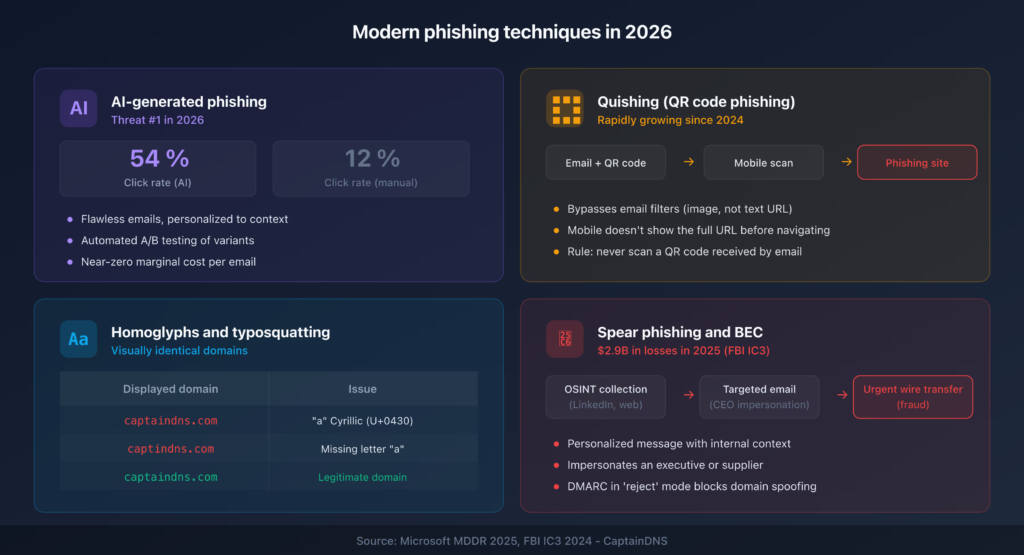
Unfortunately, artificial intelligence has changed the game.
Modern AI systems can generate emails that are:
- Grammatically perfect
- Professionally written
- Personalized to the recipient
- Contextually relevant
- Nearly indistinguishable from legitimate business communications
Cybercriminals now use AI tools to analyze public information from:
- Company websites
- Social media accounts
- Professional networking profiles
- Press releases
- Public employee directories
This allows attackers to create highly targeted phishing campaigns that appear authentic.
Look, I get it, cybersecurity sounds like a headache, but relying on old phishing detection methods is becoming increasingly dangerous.
How AI-Powered Phishing Works in 2026
Today’s attackers often combine multiple technologies.
A typical attack may involve:
AI Content Generation
Large language models generate realistic business communications.
These emails can imitate:
- CEOs
- HR departments
- Vendors
- Financial institutions
- IT support teams
Automated Research
AI can quickly gather information about:
- Employee roles
- Business relationships
- Current projects
- Company structure
Personalized Targeting
Instead of sending one generic message to thousands of people, attackers create customized emails for specific individuals.
Deepfake Support
Some phishing campaigns now combine email attacks with:
- AI-generated voice calls
- Deepfake video messages
- Fake meeting invitations
This makes verification even more challenging.
The Real Cost of AI-Generated Phishing
Many small businesses underestimate the consequences.
A successful phishing attack can result in:
Ransomware Infections
Phishing remains one of the leading delivery methods for ransomware.
One malicious click can:
- Encrypt business systems
- Disrupt operations
- Lead to costly recovery efforts
Cloud Account Takeovers
Compromised credentials can provide access to:
- Microsoft 365 accounts
- Google Workspace environments
- CRM platforms
- Financial systems
Business Email Compromise
Attackers may impersonate employees to:
- Request payments
- Change banking information
- Access confidential documents
Customer Trust Damage
Clients expect businesses to protect sensitive information.
A security incident can erode confidence quickly.
Comparison Table: Traditional vs AI-Generated Phishing Emails
| Feature | Traditional Phishing | AI-Generated Phishing |
|---|---|---|
| Grammar Quality | Often Poor | Excellent |
| Personalization | Limited | Highly Personalized |
| Research Depth | Basic | Extensive |
| Detection Difficulty | Moderate | High |
| Scalability | High | Very High |
| Executive Impersonation | Limited | Advanced |
| Success Rate | Lower | Significantly Higher |
| Business Risk | Serious | Critical |
Key Warning Signs of AI-Generated Phishing Emails
Despite their sophistication, AI-generated phishing emails often leave clues.
Unusual Urgency
Attackers frequently create pressure.
Examples include:
- Immediate payment requests
- Urgent password resets
- Last-minute account verification demands
Urgency reduces critical thinking.
Unexpected Requests
Be cautious when emails request:
- Credentials
- Financial information
- Sensitive documents
- Security code verification
Always verify independently.
Slightly Altered Email Addresses
One of the most common tactics remains domain spoofing.
Examples:
- company-support.com instead of company.com
- secure-microsoft.net instead of microsoft.com
Small differences matter.
Communication Style Changes
Even advanced AI struggles to perfectly replicate individuals.
Watch for:
- Unusual phrasing
- Different tone
- Changes in writing style
- Unexpected requests
Suspicious Attachments
Never assume attachments are safe.
Malicious files may include:
- PDFs
- Office documents
- ZIP archives
- Shared cloud links
Security Checklist for Identifying AI-Generated Phishing Emails
| Security Check | Importance |
|---|---|
| Verify Sender Address | Critical |
| Confirm Requests Through Another Channel | Critical |
| Inspect Links Before Clicking | Critical |
| Enable Multi-Factor Authentication | Critical |
| Review Attachments Carefully | High |
| Train Employees Regularly | High |
| Monitor Login Activity | High |
| Use Email Security Filters | High |
| Conduct Phishing Simulations | Medium |
| Maintain Incident Response Plans | High |
Step-by-Step Guide: Securing Microsoft 365 Against AI Phishing
Many small businesses rely on Microsoft 365.
Securing it properly can dramatically reduce phishing risk.
Step 1: Enable Multi-Factor Authentication
MFA should be mandatory for:
- Administrators
- Employees
- Contractors
This prevents many credential theft attacks.
Step 2: Configure Advanced Email Protection
Enable:
- Anti-phishing policies
- Anti-malware scanning
- Safe links protection
- Safe attachments protection
Step 3: Block Legacy Authentication
Older authentication methods are easier to exploit.
Disable them whenever possible.
Step 4: Review User Permissions
Apply the principle of least privilege.
Users should only have access to resources required for their role.
Step 5: Enable Login Alerts
Monitor:
- New devices
- Unusual locations
- Failed login attempts
Rapid detection improves response time.
Step 6: Audit Email Rules
Attackers often create hidden forwarding rules after gaining access.
Review email settings regularly.
Step 7: Conduct Monthly Security Reviews
Evaluate:
- Security policies
- User access
- Threat reports
- Incident logs
This proactive proccess helps identify weaknesses before attackers do.
Defending Remote Teams Against AI Phishing
Remote work remains a permanent reality for many organizations.
This creates additional challenges.
Secure Home Networks
Employees should:
- Update routers regularly
- Use strong Wi-Fi passwords
- Enable encryption
Deploy Endpoint Protection
Every device should have:
- Antivirus software
- Threat detection tools
- Security monitoring
Strengthen Cloud Security
Cloud environments require:
- Access control reviews
- Permission audits
- Security logging
Weak cloud management often becomes an attacker’s entry point.
Building Multiple Layers of Defense
No single security tool can stop every phishing attack.
Effective protection requires layered security.
Technical Controls
Implement:
- Email filtering
- MFA
- Endpoint protection
- DNS filtering
- Firewal protection
Employee Awareness
Human behavior remains a major security factor.
Provide regular training covering:
- Phishing detection
- Social engineering
- Credential security
- Incident reporting
Incident Response Planning
Prepare before an attack occurs.
Establish procedures for:
- Reporting suspicious emails
- Isolating compromised accounts
- Recovering systems
What to Do If an Employee Clicks a Phishing Email
Mistakes happen.
The goal is rapid response.
Immediate Actions
- Disconnect affected devices.
- Change passwords immediately.
- Revoke active sessions.
- Notify IT personnel.
- Scan systems for malware.
Investigate the Incident
Determine:
- What data was accessed
- Whether credentials were stolen
- Whether malware was installed
Strengthen Defenses
Use lessons learned to improve training and controls.
Every incident provides valuable insights.
Future Trends in AI-Powered Phishing
The threat landscape will continue evolving.
Expect increased use of:
Deepfake Communications
Attackers will combine emails with:
- Voice cloning
- Video impersonation
- AI-generated meetings
Autonomous Attack Campaigns
AI systems will automate:
- Target research
- Email creation
- Attack optimization
Hyper-Personalized Social Engineering
Future phishing emails may reference:
- Recent meetings
- Current projects
- Industry events
The level of personalization will continue increasing.
Final Thoughts
Learning how to identify AI-generated phishing emails in 2026 is one of the most important cybersecurity skills a business can develop. Artificial intelligence has dramatically increased the sophistication of phishing campaigns, making traditional detection methods less effective than ever before.
Fortunately, organizations can still defend themselves by combining employee awareness, strong authentication, cloud security management, endpoint protection, and proactive monitoring. The most successful businesses understand that cybersecurity is not a one-time project—it is an ongoing commitment.
At locknet.site, we help entrepreneurs, startups, and growing companies build a bulletproof digital presence capable of resisting modern cyber threats. From ransomware defense and phishing prevention to secure cloud management and remote workforce protection, our mission is to help businesses stay one step ahead of cybercriminals.
Ready to strengthen your defenses? Audit your email security today, subscribe to the latest cybersecurity insights from locknet.site, and consult a security specialist before the next AI-powered phishing attack targets your organization.
Leave a Reply